About Guestbook  
A W
BLOG main image
I love 'Dark다크묵墨.'!
 Category
전체 (156)
Dark다크묵墨 (61)
Media 보고 즐기고~ (16)
영화이야기 (15)
음악을 즐기자~ (14)
텍스트큐브 (11)
플래시 (8)
Web(html,script) (4)
MS Windows (4)
Server (6)
Linux (17)
 Recent Entries
[曰] 소중함이란...
태양의 노래
[뮤비] 소녀시대 - 훗 [H...
우분투 패키지 관리 재정...
우분투(10.10) 설치 후 ...
 Tags [click]
날씨 HP 가을로 post_max_size 텍스트큐브 무료 동강 rewrite show css 독후감 원더걸스 ubuntu 색상 Hoot 만남 지역 일출 왁스 족발 플래시 플레이어 변환 노바디 광화문 코드 gentoo 친구 서버 소녀시대
 Visitor Statistics
Total : 108189
Today : 152
Yesterday : 167
텍스트큐브
rss atom
'Linux'에 해당하는 글(17)
2011/01/23   우분투 패키지 관리 재정리 명령
2011/01/22   우분투(10.10) 설치 후 설정 사항들.
2011/01/19   우분투에서 고정 아이피 사용
2011/01/19   텍스트큐브 설치 시 rewrite 모듈 관련 오류 발생할 때
2011/01/18   우분투 콘솔 프롬프트 변경
2011/01/17   노트북에서 한글 및 한자 키 작동 시키기
2011/01/16   vi 에디터 세팅하기 (방향키, 백스페이스...)
2011/01/16   루트권한 얻기
2008/12/14   [리눅스 명령어] du 사용법 (디렉토리 용량 출력)
2008/05/28   cups 프린터 서버 설정
2008/05/19   날씨 애플릿 지역코드
2008/05/02   [우분투] 첫 세팅 기념하여~~
2008/03/18   [Gentoo] ATI Radeon FAQ
2008/03/13   [게시물 링크] Gentoo 리눅스의 허와실
2008/03/10   [수세리눅스] 패키지 관리자 Smart
2008/03/09   리눅스 다운로드 사이트
2007/11/22   Gentoo 리눅스 Cflags 모음


2011/01/23 16:00 2011/01/23 16:00
우분투 패키지 관리 재정리 명령
2011/01/23 16:00 | Linux/Ubuntu

설치 및 삭제 과정에서 불필요한 파일이나 패키지를 삭제

$ sudo apt-get autoclean
$ sudo apt-get autoremove

Tag : , ,

name    password    homepage
 hidden


2011/01/22 17:37 2011/01/22 17:37
우분투(10.10) 설치 후 설정 사항들.
2011/01/22 17:37 | Linux/Ubuntu
1. 테마 설치
$ sudo add-apt-repository ppa:tiheum/equinox
$ sudo apt-get update
$ sudo apt-get install gtk2-engines-equinox equinox-theme equinox-ubuntu-theme faenza-icon-theme

시스템>기본설정>모양 에서 테마세팅

2. Nautilus 업그레이드
$ sudo add-apt-repository ppa:gloobus-dev/gloobus-preview
$ sudo add-apt-repository ppa:am-monkeyd/nautilus-elementary-ppa
$ sudo apt-get update
$ sudo apt-get install gloobus-preview
$ sudo apt-get dist-upgrade
$ nautilus -q

3. 미디어(동영상, mp3 등)를 위한 Restricted extras 설치
$ sudo apt-get install ubuntu-restricted-extras

4. SMPlayer 설치
$ sudo add-apt-repository ppa:rvm/smplayer
$ sudo apt-get update
$ sudo apt-get install smplayer

5. 폰트 힌팅 관련 설정
$ sudo vi /etc/fonts/conf.d/29-language-selector-ko-kr.conf
<bool>false</bool> 부분을 찾아 false 를 true 로 변경
Tag : , , , ,

name    password    homepage
 hidden


2011/01/19 16:23 2011/01/19 16:23
우분투에서 고정 아이피 사용
2011/01/19 16:23 | Linux/Ubuntu
최초 우분투 설치시 아이피를 동적 할당 방식으로 설치한 경우 networking(/etc/network/interfaces) 데몬이 구동되는 상태입니다.
이 경우 고정 아이피 설정이 어렵더군요. 일부에선 데스크탑 버전에서만 그렇다고 하네요.
(여러 블로거들이 조언에도 불구하고 잘 안됐어요. ㅜㅜ)

networking 대신 GUI 인터페이스인 네트워크 도구로 대체하면 가능합니다.

/etc/init.d/networking stop 커맨드 입력 후 패널의 '시스템/관리/네트워크도구'를 통해 설정하시면 됩니다.
'IPv4' 항목에서 아이피, 넷마스크, 게이트웨이, DNS서버 내용을 입력하고 "모든 사용자가 사용할 수 있음"이란 옵션과 "자동으로 연결" 옵션을 체크하면 부팅할 때 바로 연결될 겁니다.


추후 다시 networking(/etc/network/interfaces)를 사용해야 할 경우 아래와 같이 커맨드 입력하세요.
/etd/init.d/NetworkManager stop
/etc/init.d/networking restart


Tag : ,

name    password    homepage
 hidden


2011/01/19 08:46 2011/01/19 08:46
텍스트큐브 설치 시 rewrite 모듈 관련 오류 발생할 때
2011/01/19 08:46 | Linux/Ubuntu
우분투에서 패키지로 아파치 설치시 rewrite 모듈이 비활성 상태이다.

다음과 같이 수정하여 활성화 시키도록 합니다.

1. mod_rewrite 설치
$sudo a2enmod rewrite

2. /etc/apache2/site-available/default  아래와 같이 수정
$sudo vi /etc/apache2/site-available/default

<VirtualHost *:80>
        ServerAdmin webmaster@localhost

        DocumentRoot /home/web-server/
        <Directory />
                Options FollowSymLinks
                AllowOverride None
        </Directory>
        <Directory /home/web-server/>  # 사용할 웹서버 루트 디렉토리
                Options Indexes FollowSymLinks MultiViews
                AllowOverride all   # 변경할 부분
                Order allow,deny
                allow from all
        </Directory>
........


3. apache 서버 재시작
$sudo /etc/init.d/apache2 restart


참고>> 경로 ' /etc/apache2/mods-enabled/'에 rewrite.load 모듈이 있는지 확인한다.
Tag : , ,

name    password    homepage
 hidden


2011/01/18 17:43 2011/01/18 17:43
우분투 콘솔 프롬프트 변경
2011/01/18 17:43 | Linux/Ubuntu

계정 홈 디렉토리에 있는 .bashrc 파일을 아래와 같이 수정한다.

52번 째 줄 부분 (변경 전)
if [ "$color_prompt" = yes ]; then
    PS1='${debian_chroot:+($debian_chroot)}\[\033[01;32m\]\u@\h\[\033[00m\]:\[\033[01;34m\]\w\[\033[00m\]\$ '
else
    PS1='${debian_chroot:+($debian_chroot)}\u@\h:\w\$ '
fi

(변경 후)
if [ "$color_prompt" = yes ]; then
        PS1='${debian_chroot:+($debian_chroot)}\[\033[01;32m\]\u@\h\[\033[00m\]:\[\033[01;34m\]\W\ $\[\033[00m\] '
else
        PS1='${debian_chroot:+($debian_chroot)}\[\033[01;32m\]\u@\h\[\033[00m\]:\[\033[01;34m\]\W\ $\[\033[00m\] '
fi

루트계정 홈 디렉토리에 있는 .bashrc 파일 수정

52번 째 줄 부분 (변경 전)
if [ "$color_prompt" = yes ]; then
    PS1='${debian_chroot:+($debian_chroot)}\[\033[01;32m\]\u@\h\[\033[00m\]:\[\033[01;34m\]\w\[\033[00m\]\$ '
else
    PS1='${debian_chroot:+($debian_chroot)}\u@\h:\w\$ '
fi
unset color_prompt force_color_prompt

(한 줄 추가하여 변경 후)
if [ "$color_prompt" = yes ]; then
    PS1='${debian_chroot:+($debian_chroot)}\[\033[01;32m\]\u@\h\[\033[00m\]:\[\033[01;34m\]\w\[\033[00m\]\$ '
else
    PS1='${debian_chroot:+($debian_chroot)}\u@\h:\w\$ '
fi
unset color_prompt force_color_prompt

PS1='${debian_chroot:+($debian_chroot)}\[\033[01;32m\]\u@\h\[\033[00m\]:\[\033[01;34m\]\w \[\033[01;31m\]\$ \[\033[00m\]'


아래는 참고 자료입니다.


출처 : http://www.ibm.com/developerworks/kr/library/l-tip-prompt/index.html

팁: 프롬프트 매직

시스템 프롬프트 향상

Daniel Robbins, CEO, Gentoo Technologies, Inc

요약: 쉘 프롬프트를 다양한 컬러와 풍성한 정보로 꾸밀 수 있는데 왜 지루한 표준 쉘을 고수하는가? Daniel Robbins는 각자가 원하는 방식으로 쉘 프롬프트를 만드는 방법을 설명한다. 뿐만 아니라 X 터미널의 타이틀바를 동적으로 업데이트 하는 방법도 설명한다.

원문 게재일:  2000 년 9 월 01 일
난이도:  초급
페이지뷰: 199 회
의견: 0 (의견 추가)

1 star2 stars3 stars4 stars5 stars 평균 평가 등급 (총 2표)

리눅스/유닉스 사용자들이라면, 많은 시간 쉘에서 작업을 한다:


bash-2.04$

여러분이 root라면, "prestige" 버전을 사용할 수 있을 것이다:


bash-2.04#

이러한 프롬프트들은 솔직히 말해서 별로다. 많은 리눅스 배포판들이 색상과 부팅 정보를 추가하여 디폴트 프롬프트를 업그레이드 한다는 것은 이상한 일이 아니다. 배포판에 멋지고 다양한 색상의 프롬프트가 있지만 완벽하지는 않다. 몇 개의 색상을 추가하거나 변경하거나 또는 프롬프트 그 자체에서 정보를 추가하거나 제거하고 싶을 것이다. 자신만의 색깔을 입히고 트릭을 가한 프롬프트를 만드는 것은 어렵지 않다.


프롬프트 기초

배쉬에서, PS1 환경 변수의 값을 변경하여 프롬프트를 설정할 수 있다:


$ export PS1="> "
>

변경 즉시 효력이 나타나고, ~/.bashrc 파일에 "export" 정의를 주어서 영구적인 것으로 할 수 있다. PS1에는 여러분도 좋아할 만한 플레인 텍스트가 포함되어 있다:


$ export PS1="This is my super prompt > "
This is my super prompt >

많은 정적 텍스트를 갖고 있는 프롬프트를 유용하지 않다. 대부분의 커스톰 프롬프트에는 현재의 사용자 이름, 작업중인 디렉토리, 호스트 이름 같은 정보가 포함되어 있다. 이러한 정보들은 쉘 내부를 탐구하는데 도움이 된다. 예를 들어, 다음의 프롬프트는 사용자 이름과 호스트 이름을 디스플레이 한다:


$ export PS1="\u@\H > "
drobbins@freebox >

이 프롬프트는 특별히 다양한 계정으로 다양한 머신에 로그인하는 사람들에게 편리하다. 어떤 머신을 실제로 사용하고 있고 현재 어떤 권한을 가지고 있는지를 알려주는 리마인더(reminder)로서 작용하기 때문이다.

위 예제에서, 배쉬에게 사용자 이름과 호스트 이름을 프롬프트로 인서트하라고 명령했다. 특별한 백슬래쉬-이스케이프 문자 시퀀스를 사용했다. 다음은 배쉬가 인식하는 모든 시퀀스 리스트이다 (배쉬 맨 페이지의 "PROMPTING" 섹션에서 리스트를 찾을 수 있다.):

시퀀스 설명
\a ASCII bell 문자 (\007)
\d "Wed Sep 06" 의 날짜(date)
\e ASCII escape 문자 (\033)
\h 호스트 이름의 첫 번째 부분( "mybox")
\H 전체 호스트 이름 ("mybox.mydomain.com")
\j ^Z를 눌러서 쉘에서 중지시킨 프로세스의 수
\l 쉘의 터미널 디바이스의 이름 ("ttyp4")
\n Newline
\r 캐리지 리턴
\s 쉘 실행파일의 이름 ("bash")
\t 24 시간 포맷의 시간 ("23:01:01")
\T 12 시간 포맷의 시간 ("11:01:01")
\@ am/pm이 있는 12시간 포맷
\u 사용자 이름
\v 배쉬 버전 (2.04)
\V 패치 레벨이 포함된 배쉬 버전
\w 현재 작업중인 디렉토리 ( "/home/drobbins")
\W 현재 작업중인 디렉토리의 "basename" ("drobbins")
\! 히스토리 버퍼에서의 현재 명령어 포지션
\# 명령어 넘버
\$ root가 아닐 경우, "$"를 삽입하라; root라면, "#"를 얻는다
\xxx 세자리 숫자 xxx에 근거한 ASCII 문자를 삽입한다. ("\007"처럼 사용되지 않은 숫자는 0으로 대체한다.)
\\ 백슬래쉬
\[ 커서를 움직이지 않는 문자 시퀀스 앞에 위치한다. 배쉬가 단어 래핑을 정확히 수행할 수 있도록 한다.
\] non-printing 문자 시퀀스 뒤에 나타난다.

색깔입히기(Colorization)

색깔 추가는 쉽다; 첫 번째 단계는 컬러 없이 프롬프트를 디자인 하는 것이다. 그런 다음에는 터미널(배쉬가 아닌)에 의해서 인식될 특별한 이스케이프 시퀀스를 추가한다. 표준 리눅스 터미널과 X 터미널로 foreground (text) 컬러와 background 컬러를 설정할 수 있다. 그리고 원한다면 볼드(bold) 문자도 가능하다. 8개의 컬러를 선택할 수 있다.

컬러는 PS1에 특별한 시퀀스를 추가함으로서 선택된다. 기본적으로 "\e["와 "m"사이에 숫자를 넣는다. 숫자 코드를 하나 이상 지정하려면 세미 콜론으로 각 코드를 구별해야 한다. 다음은 컬러 코드 예제이다:


"\e[0m"

숫자 코드로 0을 지정 할 때 이것은 터미널에게 디폴트 값으로 foreground, background, 볼드 세팅을 재설정하도록 명령한다. 이제 컬러 코드들을 살펴보자:


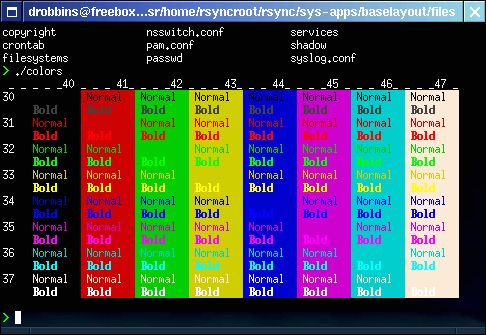
컬러 챠트
사용자 삽입 이미지
 

이 챠트를 사용하기 위해서, 사용하기 원하는 컬러를 찾고 그에 해당하는 foreground (30-37)와 background(40-47) 숫자들을 찾는다. 예를 들어, 일반적인 검정색 background에 녹색을 원하면 숫자는 32와 40이다. 그리고나서, 프롬프트를 정의하고 적당한 컬러 코드를 추가한다:


export PS1="\w> "

는 다음과 같이 된다:


export PS1="\e[32;40m\w> "

지금까지는 좋았다. 아직까지는 완벽하지 않다. 배쉬가 작업중인 디렉토리를 프린트 한 후에 "\e[0m" 시퀀스로 다시 컬러를 정상적으로 세팅해야한다:


export PS1="\e[32;40m\w> \e[0m"

이 정의는 보기 좋은 녹색 프롬프트를 만들것이다. 하지만 몇 가지 마무리 손질을 해야 한다. 40의 백그라운드 컬러 세팅을 포함 할 필요가 없다. 이것은 디폴트 컬러인 검정으로 백그라운드를 세팅하기 때문이다. 또한 녹색은 매우 희미하다; 컬러 코드 "1" 을 추가하여 이것을 픽스할 수 있다. 색깔이 더욱 밝아지고 볼드 텍스트가 된다. 이러한 변화에 더하여, 모든 non-printing 문자들을 배쉬 이스케이프 시퀀스 (\[와 \])안에 넣어야 한다. 이러한 시퀀스들은 배쉬에게 괄호안에 있는 문자들이 라인에서 공간을 차지하지 않도록 명령한다. 다음은 최종 프롬프트이다:


export PS1="\[\e[32;1m\]\w> \[\e[0m\]"

같은 프롬프트에 여러 색상을 사용하는 것에 대해 겁먹지 말라:


export PS1="\[\e[36;1m\]\u@\[\e[32;1m\]\H> \[\e[0m\]"


Xterm 즐기기

프롬프트에 정보와 컬러를 추가하는 방법을 설명했다. 더 복잡한 일도 할 수 있다. X 터미널 (rxvt 또는 aterm)의 타이틀바가 동적으로 업데이트 되도록 하는 특별한 코드를 프롬프트에 추가할 수 있다. 다음의 시퀀스를 PS1 프롬프트에 추가하면 된다:


"\e]2;titlebar\a"

"titlebar"를 xterm의 타이틀바에 나타내고 싶은 텍스트로 바꾼다. 정적 텍스트를 사용 할 필요가 없다; 배쉬 이스케이프 시퀀스를 타이틀바에 삽입할 수 있다. 다음 예제를 보자:


export PS1="\[\e]2;\u@\H \w\a\e[32;1m\]>\[\e[0m\] "

이것은 위의 스크린샷에 사용했던 프롬프트이다. 이 프롬프트가 개인적으로 마음에 든다. 왜냐하면 이것은 모든 정보를 터미널이 아닌 타이틀바에 놓았기 때문이다. 타이틀바 시퀀스를 "\[" 과 "\]" 안에 반드시 넣어야 한다. 터미널이 관련되어 있는한 이 시퀀스는 "non-printing"이기 때문이다. 많은 정보를 타이틀바에 넣을 때의 문제점은, 시스템 콘솔처럼 "비 그래픽(non-graphical)" 터미널을 사용한다면 정보를 볼 수 없다는 것이다. 이러한 문제를 픽스하기 위해 .bashrc에 다음과 같은 것을 추가할 수 있다:


if [ "$TERM" = "linux" ]
then
#we're on the system console or maybe telnetting in
export PS1="\[\e[32;1m\]\u@\H > \[\e[0m\]"
else
#we're not on the console, assume an xterm
export PS1="\[\e]2;\u@\H \w\a\e[32;1m\]>\[\e[0m\] "
fi

배쉬 조건문은 현재 터미널 세팅에 기초하여 프롬프트를 동적으로 설정할 것이다. ~/.bash_profile을 설정하여 시작할 때 ~/.bashrc을 소싱하도록 한다. 다음의 라인은 반드시 ~/.bash_profile에 있어야 한다:

이것으로 인해 로그인 쉘이나 비 로그인 쉘 중 어떤 것으로 시작하든지 같은 프롬프트 세팅이 된다.


source ~/.bashrc


참고자료

필자소개

author

Daniel Robbins는 Gentoo Technologies, inc.의 CEO이다. PC용 고급 Linux인 Gentoo Linux의 창설자이자, 차세대 Linux 포트 시스템인 Portage 시스템의 창시자이다. 또한 Macmillan사에서 출판하는 Caldera OpenLinux Unleashed, SuSE Linux Unleashed, Samba Unleashed 등에 기고활동을 하고 있다.

Tag : , , ,

name    password    homepage
 hidden


2011/01/17 09:05 2011/01/17 09:05
노트북에서 한글 및 한자 키 작동 시키기
2011/01/17 09:05 | Linux/Ubuntu
노트북의 경우 키보드가 데스크탑과 달라서 한글이나 한자키가 작동 안할 수 있다.
이 경우 아래와 같이 적용한다.

터미널에서 xev 명령을 통해 한글과 한자 키에 대한 keycode를 확인한다.
내 경우 한글키는 108, 한자키는 105 였다.

터미널에서 sudo vi ~/.Xmodmap 을 입력하여 텍스트편집창을 띄워 아래와 같이 keycode 값을 입력한다.
(사용할 계정 홈디렉토리에 파일 생성 하는 것)

keycode 108 = Hangul
keycode 105 = Hangul_Hanja

로그오프 후 다시 로그온 할 때 .Xmodmap 파일을 읽어올것인지 묻는데
읽어오기를 한 후에 키가 제대로 작동 하는지 확인하면 된다.
Tag : , , , , ,

name    password    homepage
 hidden


2011/01/16 20:35 2011/01/16 20:35
vi 에디터 세팅하기 (방향키, 백스페이스...)
2011/01/16 20:35 | Linux/Ubuntu
홈디렉토리에 .exrc 파일을 생성하여 다음과 같이 입력한다.

set autoindent      // 자동 들여쓰기
set number          // 행번호
set bs=2             // 백스페이스 사용
set nocp              // 오리지널 vi와의 호환성을 없애고 vim만의 기능을 쓸 수 있게 함

저장 후 다음을 실행한다.
$source .exrc

적용 완료~

참고로 우분투에는 기본적으로 경량화 버전이 설치되어 있다.
apt-get install vim 또는 시냅틱 패키지 관리자를 통해 vim 전체 버전 설치를 추천한다.
Tag : , , , , ,

name    password    homepage
 hidden


2011/01/16 20:08 2011/01/16 20:08
루트권한 얻기
2011/01/16 20:08 | Linux/Ubuntu
루트 패스워드 넣기
$sudo passwd root

루트권한 얻기
$su

이 후 루트 패스워드 입력후 root 권한 진입

하지만 최대한 root 진입 없이 사용하는 것이 안전하리라 생각됩니다.
Tag : , , , , , ,

name    password    homepage
 hidden


2008/12/14 19:21 2008/12/14 19:21
[리눅스 명령어] du 사용법 (디렉토리 용량 출력)
2008/12/14 19:21 | Linux
1. 기능
du 는 Disk Usage를 의미하며, 지정된 디렉토리의 디스크 사용량을 표시해준다.

2. 문법
# du [옵션] 파일

3. 옵션
-a : 디렉토리가 아닌 모든 파일에 대한 정보를 출력
-k : 결과 값을 KB 단위로 출력한다. (기본값)
-m : 결과 값을 MB 단위로 출력한다.
-h : 사용자가 이해하기 쉬운 용량의 단위를 표시한다. ((ex) KB,MB,GB)
-l : 하드 링크의 용량을 모두 계산한다.
-s : 사용량의 총 합계만 출력한다.
-S : 하위 디렉토리를 합치지 않고, 각각을 나누어서 계산한다.
지정된 디렉토리 내의 파일과 모든 하위 디렉토리의 용량, 내용까지 볼 수 있다.

4. 사용방법 및 정보
제일 많이 쓰이는 옵션 -sh

예) home 디렉토리 내의 사용량의 총합을 알아보기 쉬운 단위로 표시한다.

[root@sense tar]# du -sh /home
484K /home


Tag : , , , ,

name    password    homepage
 hidden


2008/05/28 19:04 2008/05/28 19:04
cups 프린터 서버 설정
2008/05/28 19:04 | Linux

보통 samba 서버를

0
points

보통 samba 서버를 이용해서 공유시키는 방법이 속 편하긴 하지만...
다른 방법을 소개해드릴랍니다. 이 방법의 장점도 글 마지막에 언급하겠습니다.

편의상,
프린터가 연결된 리눅스 PC 의 ip 가 192.168.1.1
외부에서 접속해서 프린트하려는 리눅스 PC 의 ip 는 192.168.1.2
외부에서 접속해서 프린트하려는 MS PC 의 ip 는 192.168.1.3

cups 설정은 http://127.0.0.1:631 로 접속해서 하세요.

프린터가 연결된 데스크탑 리눅스(192.168.1.1)의 cups 설정을 제대로 합니다.
프린트가 제대로 되는지 확인합니다.
프린터이름을 my_printer_1 으로 했다 칩니다.

cups 설정파일에서 보안관련 부분을 적절히 수정합니다.
외부에서 접속해서 프린트할 수 있도록 하는 것인데, 지시자들이 직관적이므로 어렵지 않습니다.

cups-lpd 패키지를 추가로 설치합니다.
(MS windows 를 위한 겁니다.)

192.168.1.2 (외부 리눅스PC) cups 설정에서
ipp://192.168.1.1/printers/my_printer_1
으로 잡고, 프린터모델은 raw, 드라이버는 raw_queue 로 해줍니다.
테스트 프린트 해봅니다.
리눅스 쪽의 설정은 이것으로 끝입니다. ipp 를 사용하기 때문입니다.

192.168.1.3 (외부 MS PC) 에서

[시작]->[프린터및팩스]->[프린터추가]
-> [이 컴퓨터에 연결된 로컬 프린터]
-> [새 포트 만들기] : Standard TCP/IP Port
   -> 프린터이름또는IP주소 : 192.168.1.1
      프린터포트 : IP_192.168.1.1
   -> 장치유형: 사용자지정 [설정]
     -> 프로토콜: LPR
        LPR설정: 대기열이름 : my_printer_1
                 LPR 바이트계산 사용 체크(중요)

마지막으로, 프린터에 맞는 프린터 드라이버를 설치해야 합니다.
lpr 을 사용하지 않기 위해 여러모로 노력해 봤지만 허사였습니다. 결국은 이렇게 해야만 제대로 프린트가 되더군요.(세 종류의 프린터로 테스트를 해봤습니다. hp/samsung/epson)
분명히 네트웍프린터, 즉 공유프린터이건만 MS OS 에서는 "로컬 프린터"로 분류되기 때문에... 연말정산 프린트가 가능합니다.


## 펌 글인데 어디서 퍼온 건지 기억이 안나네요. ㅡㅡ;;;  ##
Tag : , ,

name    password    homepage
 hidden


2008/05/19 05:46 2008/05/19 05:46
날씨 애플릿 지역코드
2008/05/19 05:46 | Linux

안동

KSXX0001

안양

KSXX0002

창원

KSXX0003

제주

KSXX0004

진해

KSXX0005

천안

KSXX0006

청주

KSXX0007

해남

KSXX0008

인천

KSXX0009

이리

KSXX0010

강릉

KSXX0011

김천

KSXX0012

군산

KSXX0013

광주

KSXX0014

마산

KSXX0015

밀양

KSXX0016

목포

KSXX0017

오산

KSXX0018

포항

KSXX0019

벌교

KSXX0020

부산

KSXX0021

서울

KSXX0022

속초

KSXX0023

성남

KSXX0024

수원

KSXX0025

대구

KSXX0026

대전

KSXX0027

위성

KSXX0028

울산

KSXX0029

왜관

KSXX0030

여수

KSXX0031

속초

KSXX0032

철원

KSXX0033

대관령

KSXX0034

춘천

KSXX0035

동해

KSXX0036

서울

KSXX0037

원주

KSXX0038

울릉도

KSXX0039

영월

KSXX0041

서산

KSXX0042

울진

KSXX0043

추풍령

KSXX0044

포항

KSXX0045

군산

KSXX0046

전주

KSXX0047

마산

KSXX0048

광주

KSXX0049

부산

KSXX0050

충무

KSXX0051

완도

KSXX0052

제주

KSXX0053

서귀포

KSXX0054

진주

KSXX0055

Tag : , , , ,

name    password    homepage
 hidden


2008/05/02 18:54 2008/05/02 18:54
[우분투] 첫 세팅 기념하여~~
2008/05/02 18:54 | Linux/Ubuntu

지금 현재 서버로 사용하고 있는 배포판은 Gentoo이다.
하지만 서버로 관리하기는 편한 반면에 데탑용으로 쓰기엔 시간적인 면에서 무리가 있다.
처음 설치하기가 어렵다는 단점이... (물론 한번 세팅후 백업해 놓으면 되긴 하지만...)
X윈도우 관련하여 세팅중 계속해서 무언가가 꼬여 버려 백업시기를 놓쳐 버리기도 하고...
권한 관련 부분이 엉켜서 프로그램이나 데몬의 실행이 이상해지기도 한다.

그리고 현재 Gentoo 포럼이 계속적으로 운영 중단 상태이다.
의견을 주고 받을 공간이 없다는 건 리눅서들에겐 버거운 문제인 듯하다.

이에 비해 우분투의 경우 초기 세팅이 설치와 동시에 간단히 이루어지는 것이 편하다.
장치 드라이버의 경우 MS windows 보다 편리함을 느꼈다.
오픈 소스이다 보니 여러가지 응용 프로그램을 세팅할 때에는 의존성이나 충돌 문제도 발생하지만 커뮤니티를 통해 해결해 나가는 부분의 재미가 쏠쏠하다.

지금 세팅해 놓은 우분투의 경우 가상머신(가끔 불가피한 윈도우즈 사용) 과 네트웍 공유 문제만 해결하면 사용하는데 큰 무리가 없을 듯하다.
물론 다중 부팅을 통해 윈도우즈를 사용할 수도 있으나 재부팅의 과정은 번거롭기만 하다.

다음에 원활한 동영상 캡쳐가 되면 동영상도 올리도록 하겠다.
서버 리눅서에서 데탑 리눅서로 거듭나기를 바라며~~

사용자 삽입 이미지

Tag : ,

name    password    homepage
 hidden


2008/03/18 07:26 2008/03/18 07:26
[Gentoo] ATI Radeon FAQ
2008/03/18 07:26 | Linux

본 글은 http://odin.prohosting.com/wedge01/gentoo-radeon-faq.html 에서 발췌하였음을 밝힙니다.


Gentoo ATI Radeon FAQ

Last updated: 16/05/07


This document is intended to help users of Gentoo Linux install and use the binary Linux drivers provided by ATI. If you have anything you want to add, email me: wedge__ AT fastmail.fm or PM me on the Gentoo forums (my username is Wedge_)

Section 1 - Information about the drivers

1.1 - Why use the ATI binary drivers?
1.2 - Where can I get the drivers?
1.3 - Which cards are supported by the driver?
1.4 - Are PCI / PCIe cards supported?
1.5 - Which version should I use?
1.6 - Can I use the "radeon" driver or not?
1.7 - Where can I get diagnostic information if I have a problem?
1.8 - What can I use to benchmark performance?
1.9 - Can I overclock my Radeon card under Linux?
1.10 - Can I use the drivers with Xorg?
1.11 - Where can I get more information about the drivers?

Section 2 - Kernel configuration

2.1 - Which kernel options are important for the ATI drivers?
2.2 - Which kernel versions can I use with the drivers?
2.3 - Do I need to select the "ATI chipset support" kernel option if I have an ATI card?

Section 3 - Installing the drivers

3.1 - How do I install the drivers?
3.2 - What is aticonfig?
3.3 - Can I still use the fglrxconfig tool to configure the driver?

Section 4 - Troubleshooting

4.1 - I get frequent lockups on games like Tux Racer, Return to Castle Wolfenstein, or Enemy Territory, what can I do to fix it?
4.2 - When I try to start X, it fails with a message saying it was 'unable to acquire AGP, error "xf86_ENODEV"'
4.3 - When I try to start X, it fails with a message saying it was 'unable to acquire AGP, error "xf86_ENOMEM"'
4.4 - I tried to emerge the drivers, but it didn't work. The error message was "cannot find -lGL"
4.5 - X is ignoring my modeline setting, or I can't get the refresh rate I want
4.6 - When I try to run the fgl_glxgears program, I get an error saying "couldn't get fbconfig"
4.7 - When I try to run "modprobe fglrx" it doesn't work
4.8 - X appears to start correctly, but everything seems slow and I don't have 3D acceleration
4.9 - I'm having problems with a VIA KT400/KT400A motherboard and a 2.4 kernel
4.10 - I'm trying to use the driver with "UseInternalAGPGART" set to "yes", but it doesn't work
4.11 - My glxgears score is very low (<120), but everything seems to be working. Why?
4.12 - I have a Radeon 9800XT, and direct rendering doesn't work. How can I fix it?
4.13 - I have an Epox 8RDA motherboard and can't get direct rendering to work using a 2.6 kernel
4.14 - I get errors about MTRR overlaps in my logs, how can I get rid of them?
4.15 - What does this "(WW) fglrx: No matching Device section for instance (BusID PCI:x:0:1) found" message mean?
4.16 - I'm using the Xorg Xserver and 3D acceleration isn't working
4.17 - Why does my system hang when I close down X?
4.18 - I get error messages from fglrx in my dmesg output, how can I get rid of them?
4.19 - Do the ATI drivers support 16 bit colour depth?
4.20 - I have an AMD64 system - can I use the drivers?
4.21 - X fails to start and the error message mentions "gnu_dev_makedev"
4.22 - Emerging the drivers fails at "probing for VMA API version... "
4.23 - OpenGL applications fail with the error "libGL error: InitDriver failed"
4.24 - My X server fails to start - the error is "Caught signal 11"
4.25 - X fails to start with an X300 card
4.26 - Celestia segfaults when I try to run it
4.27 - How do I enable or disable vertical sync?
4.28 - Can my CFLAGS prevent the driver from working?
4.29 - Can my USE flags cause problems?
4.30 - Why are all 3D applications only displaying a black screen?
4.31 - Why doesn't the RANDR extension work?
4.32 (AMD64) - X starts up with a corrupted screen and then locks up
4.33 - I'm using a hardened version of GCC and can't get direct rendering to work
4.34 - 3D applications fail to start and/or display lots of errors about "FGLTexMgr"
4.35 - 3D acceleration doesn't work after enabling the new Composite extension in Xorg
4.36 - Games like Tuxracer and Chromium fail to start, but 3D acceleration is enabled
4.37 - Why don't I have XVideo support?
4.38 - Is there any way to fix the memory leaks in Neverwinter Nights?
4.39 - How do I get TV-out working on a Notebook with ATI Radeon Mobility Chipset?
4.40 - X appears to be starting up, but I can only see a black screen
4.41 - My card isn't detected by the driver, is there anything I can do?
4.42 - I've emerged ati-drivers but I don't have an fglrx module, why?
4.43 - X is crashing when I try to drag windows or run applications, why?
4.44 - I get "out of vmalloc space" errors in my dmesg output
4.45 - I have a 64-bit system and can't get 3D acceleration in 32-bit applications
4.46 - How can I enable suspend/resume with direct rendering enabled?
4.47 - I'm getting errors loading the GLX module after replacing an nvidia card with an ATI card
4.48 - Why can't I get direct rendering enabled with AGP and PCI cards installed?
4.49 - Why can't I get the "new-login" feature of xscreensaver to work without crashing?
4.50 - None of this stuff helped! Is there anything else I can do?

Section 5 - Miscellaneous

Section 6 - Credits

Section 1 - Information about the drivers

Question 1.1: Why use the ATI binary drivers?
The ATI binary drivers are at present the only drivers which support 3D acceleration on cards based on the R3xx and R4xx chipsets. This includes recent cards such as the 9500, 9600, 9700, and 9800 series, plus the high end mobility chipsets and X-series cards.

An effort to develop an opensource driver for the high end Radeon chipsets is underway
here. If you want to try this driver, be aware that it is still under development and that you may encounter serious problems.

Question 1.2: Where can I get the drivers?
All recent driver versions can be found in the portage tree, under the category x11-drivers/ati-drivers. Note that the most recent version(s) may be marked as unstable (~x86). To emerge these versions, assuming that you're not already running an ~x86 system, you should do the following:
   mkdir -p /etc/portage
   echo "x11-drivers/ati-drivers ~x86" >> /etc/portage/package.keywords
You should then be able to emerge all versions of the driver, unless they are hardmasked for some reason.

The drivers can also be downloaded directly from the ATI website in the same way as for Windows drivers. Go to
http://www.ati.com/support/driver.html, and select "Linux" from the first column. Then pick "Graphic Driver" from the second column. Pick the correct type of card from the last column and click the "Go" button to be taken to the download page.

Question 1.3: Which cards are supported by the driver?
The following list of supported cards is taken from the release notes of the 8.30.3 driver version (
http://www2.ati.com/drivers/linux/linux_8.30.3.html). PCIe support is available in all driver versions since 3.14.1. Note that this list is not always up to date - check the release notes for the latest drivers for the most current information.
  • Radeon 9500 series (including R9550)
  • Radeon 9600 / 9700 / 9800 series
  • Radeon X-series (X300 / X550 / X600 / X700 / X800 / X850)
  • Radeon X1K-series (X1300 / X1600 / X1800 / X1900)
  • Radeon Mobility X-series (X300 / X600 / X700 / X800)
  • Radeon Mobility X1K-series (X1300 / X1400 / X1600 / X1800)
  • Radeon Mobility models 9500 / 9550 / 9600 / 9800
  • FireGL models (workstation cards): V7350 / V7300 / V7200 / V7100 / V5200 / V5100 / V5000 / V3400 / V3300 / V3200 / V3100 / X3-256 / X3 / X2-256 / Z1-128 / T2-128 / X1-128 / X1-256p / FireMV 2200 / Mobility FireGL V5000 / Mobility FireGL T2
  • Radeon Xpress 200 / Radeon Xpress 1250 IGP
NOTE: Older ATI cards should be supported by the opensource "radeon" and "ati" drivers that are supplied as part of XFree or Xorg. Also note that if you use an older version of the driver, it may not support all the cards listed above. If you have a newer card that is not listed here, it may be possible to get the driver working with it using the techniques described in Q4.41.

Question 1.4: Are PCI / PCIe cards supported?
PCIe cards are supported in all recent driver versions as mentioned in
Q1.3. PCI cards are apparently supported as well (eg R9200 PCI) but several people have had great difficulty in attempting to get the driver working with such cards. A possible alternative if you're in this situation is to use the opensource "radeon" driver instead.

Question 1.5: Which version should I use?
It is usually best to use the most recent version of the driver (currently 8.36.5). Older versions are available in portage if you have problems with the newest release. To emerge an older version, use the following style of emerge command: emerge =ati-drivers-3.2.8-r1. This tells portage to install that specific version of the package rather than the latest available version.

Sometimes, the latest driver version will not be available if you're running a "stable" system (ie ACCEPT_KEYWORDS="x86" instead of "~x86", "amd64" instead of "~amd64"). If you are in this position and want to install the latest driver (this can be necessary if you have a new card not supported by the older drivers), you should use the /etc/portage/package.keywords file to selectively unmask the relevant packages (eselect, eselect-opengl, ati-drivers, ati-drivers-extra). For example, to install ati-drivers and ati-drivers-extra on an x86 system, you would add these two lines to /etc/portage/package.keywords (create the directory and file if they don't exist already):
   x11-drivers/ati-drivers ~x86
   x11-drivers/ati-drivers-extra ~x86
Question 1.6: Can I use the "radeon" driver or not?

The "radeon" driver has support for all recent Radeon cards, but does not support 3D acceleration for newer cards (generally those based on the R300/R350 chipset and later, like the 9600 and 9800). For other cards, like the R8500, R9000, or R9200, it should support full 3D acceleration, so you can use it as an alternative to the ATI driver. As mentioned in Q1.3, it also supports many older cards that the ATI binary driver does not. For more information, see the manpage for the driver (man radeon).

Question 1.7: Where can I get diagnostic information if I have a problem?
  • The output from the dmesg command
  • The output from the glxinfo command. Also try running glxinfo after doing export LIBGL_DEBUG=verbose. This will produce additional output that can sometimes be helpful in diagnosing problems. Setting LIBGL_DEBUG will also cause many games and applications (eg Celestia) to display more output than normal, so it can also be useful if you're having trouble with a particular game.
  • The XFree logfile: /var/log/Xorg.0.log (or /var/log/XFree86.0.log if you're still using XFree)

Question 1.8: What can I use to benchmark performance?
Your best bet is probably to run some timedemos in a game such as Unreal Tournament 2004 or Quake 3 (both of these have free demos you can use). However, do not try to use the well known glxgears application for accurate performance measurements. It is
not intended to be a benchmark.

Question 1.9: Can I overclock my Radeon card under Linux?
Yes. Gentoo user Hasw has written a Radeon overclocking tool - see
this forum thread.

Question 1.10: Can I use the drivers with Xorg?
Yes, the drivers have had Xorg support for some time now.

Question 1.11: Where can I get more information about the drivers?
As the ATI driver isn't provided with much in the way of documentation, a project has been started to produce a complete set of man pages for the driver and it's associated applications (eg aticonfig, fgl_glxgears). The project is hosted at
http://cvs.wgdd.de/cgi-bin/cvsweb/fglrx_man/. Although it's intended for Debian distros, the information it contains will apply equally well to other distros, such as Gentoo, and they are currently looking for contributions, particularly for the "fglrx" manpage.

Section 2 - Kernel configuration

Question 2.1: Which kernel options are important for the ATI drivers?
The following kernel options must be set correctly:
NOTE 1: in 2.4 kernels, the "Device drivers" category that the last 3 settings are normally found under does not exist. Instead, you should find them in the "Character devices" section straight from the top level menu.
NOTE 2: if you have a PCIe card, the AGP settings should be irrelevant. If you encounter problems, make sure you're using a recent kernel and the latest driver version. Some people have also reported that they had to enable AGP for their PCIe cards to work.

AMD64 users: if you're running a 32-bit kernel, follow the advice above. If you're using an AGP card, you should also select the Device drivers -> Character Devices -> AMD Opteron/Athlon64 on-CPU GART support option. If you compile it as a module, it will be called "amd64-agp" and should be loaded before the fglrx module, along with the other kernel AGP modules (see Q3.1). If you're using a PCIe card, then as noted above, it shouldn't be necessary to enable AGP, but it may be worth trying if you have problems.

If you're running a 64-bit kernel, then the /dev/agpgart support and AMD Opteron/Athlon64 on-CPU GART support will usually be enabled automatically. Again, if you don't have an AGP card, it should be safe to disable these options.

Question 2.2: Which kernel versions can I use with the drivers?
All versions of the drivers in the portage tree should be compatible with 2.4.x kernels. Any version from 2.9.13-r1 or above should also work on 2.6 kernels. However, there is no guarantee that the driver will compile against heavily patched kernels. It is impossible for ATI to test the drivers against any more than the most common kernel versions. If you like to run the latest nitro/mm/love/ck/cko-sources or any of the other custom patchsets out there, be aware that they may well break the driver in some way. This can show up either as a failed compilation of the driver, or as a failure to load the fglrx kernel module. In many cases patches to fix such problems can be found on the Gentoo or
Rage3D forums, but you can't always rely on this. If you aren't able to fix the problem yourself, and can't find a patch, you should revert to a previous kernel version.

Question 2.3: Do I need to select the "ATI chipset support" kernel option if I have an ATI card?
No, you do not usually have to enable this option. If you read the attached help text, you will see:
"This option gives you AGP support for the GLX component of XFree86 4.x on the ATI Radeon IGP family of chipsets".
In other words, you don't need this unless you have a system with an IGP integrated graphics chipset. If you have a normal AGP card, ignore this option.

Section 3 - Installing the drivers

Question 3.1: How do I install the drivers?
NOTE: this is based on the guides that were originally posted in the following thread on the Gentoo forums:
http://forums.gentoo.org/viewtopic.php?t=73260.
  1. The first stage of installing the drivers is configuring your kernel properly. Q2.1 lists the relevant options and what they should be set to.
  2. Next, check that the /usr/src/linux symlink is pointing to the directory containing the sources for your current kernel. If you're not sure which kernel version you're running, use the uname -r command to display it. As an example, if you're running kernel 2.6.1, then ls -l /usr/src/linux should show the following:
    lrwxrwxrwx 1 root root 26 Feb 6 14:19 /usr/src/linux -> /usr/src/linux-2.6.1. If the symlink is correct, move on to step 3. If it's not correct, run the command rm -f /usr/src/linux followed by ln -s /usr/src/linux-`uname -r` /usr/src/linux, which will recreate the symlink and point it to the correct kernel source directory.
  3. If you had to change any kernel options in step 1, you should now recompile the kernel and reboot. To recompile the kernel run the following commands from the /usr/src/linux directory.
    For 2.4 kernels: make dep && make clean bzImage modules modules_install
    For 2.6 kernels: make && make modules_install

    If you have to mount your /boot partition, do so now (mount /boot), then copy your new bzImage over: cp /usr/src/linux/arch/i386/boot/bzImage /boot/<your kernel name>
    Remember to update your bootloaders configuration file if necessary, then reboot.
  4. Now you should be ready to install the drivers, which you can do by running emerge ati-drivers. Pay attention to the output displayed by the ebuild - it will NOT abort if the fglrx kernel module fails to compile, and this is easy to miss. If you find that you get a "Module fglrx not found" error when trying to load the fglrx module at a later stage, this is often the cause.
  5. When the emerge has completed, you should now configure your /etc/X11/xorg.conf file. If you're just upgrading from a previous driver version, it will usually be OK to continue using your existing configuration file. However, there may be occasions when a new driver introduces new settings that have to be configured in the /etc/X11/xorg.conf file.

    Configuring the /etc/X11/xorg.conf file was originally done using the fglrxconfig application (see Q3.3), but ATI now recommend using aticonfig, which was introduced in recent driver versions. aticonfig is designed to update your existing configuration rather than replace it with a new one, which is a bit more convenient. A basic configuration can be produced simply by running the command aticonfig --initial --input=/etc/X11/xorg.conf. Run the application without arguments for a listing of the various parameters and some examples. You can run aticonfig again in future to enable/disable any of the other various settings the driver supports.

    If you find that you get a "command not found" error when trying to run aticonfig, you may have to run env-update && source /etc/profile before it will work. This happens because aticonfig is installed into /opt/ati/bin, and this location won't normally be part of your $PATH environment variable ($PATH contains the directories where the shell looks for executables)

  6. Run opengl-update ati to switch to the ATI OpenGL libraries. opengl-update is being deprecated in favour of eselect. You should already be able to use the replacement command eselect opengl set ati if your system is up to date.
  7. If you're using the kernel AGP support (see step 4), and have it compiled as modules, load them now. For 2.4 kernels, you just need to load the agpgart module. For 2.6 kernels, you need to load agpgart and a second module, the name of which is dependent on your motherboard. nForce users should load nvidia_agp, VIA users via_agp, Intel users intel_agp, and so on. You should add the modules that you require to /etc/modules.autoload.d/kernel-2.4 or /etc/modules.autoload.d/kernel-2.6 to ensure they are loaded on every boot. You should also add the fglrx module to the list, after the kernel AGP modules.
  8. Before starting X, ensure that you have all the necessary modules loaded and that your xorg.conf file is configured to your liking.
  9. Once X is started, you can check if Direct Rendering (ie 3D acceleration) is working by running glxinfo | grep direct. This should display direct rendering: Yes if everything is working.
  10. Finally, remember that you need to emerge the ati-drivers ebuild each time you change your kernel version. Remember to update the symlink as described above before doing so.
Question 3.2: What is aticonfig?
aticonfig is the name of a new application included with recent versions of the ATI Linux driver. Unlike the fglrxconfig application, which generates an entirely new xorg.conf file, aticonfig can be used to make changes to an existing xorg.conf. For example, you can use the aticonfig --initial command to insert a "Device" section for your ATI card into an xorg.conf. Run the application without arguments for a complete listing of options and some usage examples. aticonfig is intended to replace fglrxconfig at some point in the future as a means of configuring the driver.

Question 3.3: Can I still use the fglrxconfig tool to configure the driver?
For the moment, yes, but it may be removed in the future (although it will still obviously be included in older drivers). To install the driver using fglrxconfig, follow the procedure in
Q3.1 up to step 5. Instead of running aticonfig, run fglrxconfig and answer the questions it asks. Remember that unlike aticonfig, fglrxconfig will replace your existing configuration file by default. Be aware that it may not set up your mouse or keyboard correctly - if you have a working configuration file, keep a copy of it somewhere so that you can refer to it if you encounter problems. If you find that you get a "command not found" error when trying to run fglrxconfig, you may have to run env-update && source /etc/profile before it will work. This happens because fglrxconfig is installed into /opt/ati/bin, and this location won't normally be part of your $PATH environment variable ($PATH contains the directories where the shell looks for executables)

At one point, the program will ask you "Do you want to use the external AGP GART module (y/n)? [n]". It wants to know if it should rely on the AGP support contained in the driver itself, or if it should use the kernels own AGP modules. The answer to this question will vary from system to system - sometimes either option will work, sometimes only one will work. Answering "n" means use the drivers AGP support, "y" means use the kernel AGP support.

This setting can be changed later on through the "UseInternalAGPGART" option in your X configuration file (/etc/X11/xorg.conf or /etc/X11/XF86Config-4). Setting "UseInternalAGPGART" to yes means "use the AGP support in the driver", and setting it to no means "use the AGP support from the kernel" (this requires kernel AGP to be enabled - see Q2.1).

There is some potential for confusion here because of the way fglrxconfig asks its question, so I'll try and state things explicitly. When you answer "yes" to the question ("Yes, I want to use the kernel AGP support"), it will set "UseInternalAGPGART" to "no". When you answer "no" ("No, I want to use the AGP support in the driver"), it will set "UseInternalAGPGART" to "yes". Make sure you don't get mixed up between the answer to the question and the value of the "UseInternalAGPGART" setting.

Note: fglrxconfig versions in the latest drivers (>= 8.10.19) should produce an xorg.conf by default. Older versions may produce an XF86Config-4 instead, so Xorg users should rename the config file to /etc/X11/xorg.conf before continuing. Even more important, Xorg 6.8 users should edit the new config file and change the keyboard driver name from "Keyboard" to "kbd". If you don't do this, X will fail to start. The reason for this is that the driver name changed between Xorg 6.7 and 6.8, and older versions of fglrxconfig may still use this naming. The most recent versions no longer have this problem.

Section 4 - Troubleshooting

Question 4.1: I get frequent lockups on games like Tux Racer, Return to Castle Wolfenstein, or Enemy Territory, what can I do to fix it?
Try upgrading to the latest version of the drivers. For games based on the Quake 3 engine (Q3A, RTCW, ET etc), try running them in the following way: et +set r_ext_compiled_vertex_array 0. You can also disable the "r_ext_compiled_vertex_array" setting permanently by setting it to 0 in the game console or your config file. However, disabling this setting may decrease performance.

This problem should not exist in the recent versions of the driver (>3.2.8).

Question 4.2: When I try to start X, it fails with a message saying it was 'unable to acquire AGP, error "xf86_ENODEV"'
This error can have many causes, but some of the most common are:
  • You have no AGP support compiled into your kernel - see Q2.1
  • You have AGP support compiled as modules but don't have the modules loaded. In a 2.4 kernel, you just need to load the "agpgart" module. However, in a 2.6 kernel, there are TWO modules which have to be loaded. The first is "agpgart", and the second depends on the AGP chipset option you selected in the kernel config (which depends on the type of motherboard you have). If you picked the nVidia option, load the module "nvidia_agp". If you picked the VIA option, load "via_agp". If you picked the SiS option, load "sis_agp" and so on.
  • You have AGP support for the wrong chipset in the kernel - see Q2.1
  • Some AMD motherboards can cause trouble setting up the AGP aperture when booting Linux, due to problems with the way the BIOS operates. In some cases, changing your BIOS version can fix this problem. There are also some kernel patches available to try and fix the problem, see this kernel bugzilla entry, and this Gentoo forums posting for more information and links to the patches.
  • Try cleaning up your kernel source directory. You can do this in two main ways. First, by unmerging and remerging the kernel (assuming your current kernel is pointed to by /usr/src/linux):
       emerge -C development-sources OR vanilla-sources OR mm-sources etc
       cp /usr/src/linux/.config ~/config (make a copy of your kernel config)
       rm -fr /usr/src/linux-x.y.z (where x.y.z is the kernel version you just unmerged)
       emerge development-sources OR vanilla-sources OR mm-sources etc
       cp ~/config /usr/src/linux/.config
       cd /usr/src/linux
       make oldconfig
    or by the following method:
       cd /usr/src/linux
       cp .config ~/config (make a copy of your kernel config)
       make mrproper
       cp ~/config .config
       make oldconfig
    After you have done this, rebuild the kernel, then remerge the ati-drivers package and try again.
Question 4.3: When I try to start X, it fails with a message saying it was 'unable to acquire AGP, error "xf86_ENOMEM"'
This error is generally more difficult to diagnose and fix than the "xf86_ENODEV" error. Some things to try:
  • If you are using the kernel AGP support (ie "UseInternalAGPGART" is set to "no"), ensure that you have the necessary modules (agpgart + chipset-specific module) loaded BEFORE loading the fglrx module. For example, if you have a VIA motherboard, load the "agpgart" and "via-agp" modules, then load the fglrx module (on 2.4 kernels, you only have to load the "agpgart" module). If you had an nForce board, you would load "agpgart" and "nvidia-agp", followed by fglrx, and so on for the other chipset types.
  • Increase your AGP aperture size in the BIOS (particularly for nForce2 boards)
  • If you have an nForce2 board, try disabling the "AGP 8x Support" option in the BIOS.
  • Check that you haven't set "UseInternalAGPGART" to "yes" and have your kernel AGP settings compiled in (this won't work)
  • Set "UseFastTLS" to "2" in your XF86Config/xorg.conf file.
  • Try adding the line
    Option "KernelModuleParm" "agplock=0"
    to your xorg.conf file (in the same place as the other ATI-specific options).
  • Check the output of the "dmesg" command for errors.
  • Check that your kernel configuration is correct.
  • Try a newer kernel version.
Question 4.4: I tried to emerge the drivers, but it didn't work. The error message was "cannot find -lGL"
(this problem should be fixed)
As root, do this:
   opengl-update xfree / opengl-update xorg-x11
   emerge ati-drivers
   opengl-update ati

Question 4.5: X is ignoring my modeline setting, or I can't get the refresh rate I want
Try changing the "IgnoreEDID" setting in /etc/X11/xorg.conf to "on".

NOTE: This option now appears to be ignored by newer driver versions. In addition, many people have reported problems getting custom modelines to work with driver versions later than 8.14.13 - see
this bug report. Downgrading to 8.14.13 seems to be the best solution for the moment.

Question 4.6: When I try to run the fgl_glxgears program, I get an error saying "couldn't get fbconfig"
Make sure you have run eselect opengl set ati (or opengl-update ati) as root.

Question 4.7: When I try to run "modprobe fglrx" it doesn't work
There are a number of possible causes for this. The first thing to do is to get the error message given when you try to load the module. If the output from modprobe doesn't tell you anything, check the last few lines of "dmesg" output just after you've run it. There will usually be a better description of the error there.

Check that your /usr/src/linux symlink is pointing to the set of kernel sources that you are currently using. If the link isn't correct, the module will be generated for the wrong kernel and modprobe won't be able to find it. To update the link, use the following command: ln -sf /usr/src/linux-2.x.y /usr/src/linux

If modprobe cannot find the module even after checking the /usr/src/linux symlink is correct, the problem is usually that the compilation of the module has failed. The ati-drivers ebuilds will complete successfully even if the module fails to compile, so it is easy to miss this problem. Re-run the emerge, and watch carefully for errors in the compilation process, particularly if you are using a heavily patched kernel (see
Q2.2).

If modprobe fails with an "Invalid module format message", and the dmesg output contains lines similar to this: "fglrx: version magic '2.6.1-gentoo-r1 SMP preempt K7 gcc-3.3' should be '2.6.1-gentoo-r1 SMP preempt K7 gcc-3.2'" then it usually means that you have compiled the drivers with a different gcc version than you compiled the kernel with. To fix this, just recompile the drivers with the same gcc version as the kernel (the second one in the message above), or recompile both driver and kernel with the same version. This error may also be caused in other ways. For example, if you have compiled a kernel with 4k stacks support, but are still using the fglrx module from a normal 8k stacks kernel, you will get a message similar to that above, except that the difference between the two versions will be that one mentions "4KSTACKS" while the other does not. In this case, the solution is to remerge the drivers and load the newly compiled module.

If the "dmesg" output mentions "unresolved symbols", it's possible that the kernel version you're using has had some patches applied to it that aren't compatible with the drivers (Q2.2). The easiest thing to do is try a different kernel version. If you can create a patch for the drivers that fixes the problem, submit it to bugs.gentoo.org so that it can be included in future releases of the ebuild.

If the "dmesg" output says something similar to "the fglrx module must be loaded before any other DRM module", then it probably means that you still have DRM support in your kernel, which has been loaded before the fglrx module and is preventing it from working properly. Another indication of this problem is an "Operation not permitted" error from modprobe. See Q2.1 for more information on the DRM settings in the kernel.

If the error is "No device found", it means the driver does not support your card. If you have an older card, there's not much you can do except try the opensource "radeon" driver. If you have a new card, it's possible that the driver simply hasn't been updated with the necessary information to allow it to recognise your device. It can be made to work with a little extra effort. See Q4.41 and fglrx_binary_edit.

Question 4.8: X appears to start correctly, but everything seems slow and I don't have 3D acceleration
You may have forgotten to load the "fglrx" module. The module is necessary for 3D acceleration to work, but is not always loaded automatically by X. It's best to add it to your /etc/modules.autoload.d/kernel-2.x file, where x is the correct kernel version. This ensures it's loaded before you start X. The fglrx entry should be placed after the kernel AGP modules, if you are using them.

If the fglrx module is loaded (ie it appears in the output of the lsmod command), then something else must be wrong. Check your X logfile (/var/log/XFree86.0.log or /var/log/Xorg.0.log) for errors. If you find an error message that looks like this:
   (EE) fglrx(0): incompatible kernel module detected - HW accelerated OpenGL will not work
it means that the version of the fglrx module you have loaded does not match the version of the driver you have installed. This can happen if you change driver version without unloading and reloading the fglrx module (or rebooting). To fix this error, you can simply reboot, or run rmmod fglrx && modprobe fglrx which will unload the old module and load the new one.

If you have an nForce2 board, try toggling the "Primary VGA Bios" setting (in the BIOS obviously :)) to the opposite of whatever it currently is. This seems to be quite rare (only 1 case I know of) but it did seem to enable 3D acceleration where it wasn't working before.

It may also help in some situations to emerge libstdc++-v3, which is a "compatibility package for running binaries linked against a pre gcc 3.4 libstdc++". If your Xorg log shows that things appear to be starting up OK, but you don't have direct rendering enabled, this may be the problem. See
here and here for more information.

Question 4.9: I'm having problems with a VIA KT400/KT400A motherboard and a 2.4 kernel
Many people have had problems with these motherboards in combination with 2.4 kernels, mainly because of AGP issues. The AGP support in 2.4 kernels currently doesn't support the KT400 chipset properly, and you may get messages during bootup along the lines of "agpgart: unable to determine aperture size". The AGP support in the ATI driver also has problems with this chipset - it might work for you, it might not. The best way to get around this problem at the moment is to upgrade to a 2.6 kernel, which has better AGP support and should work well with KT400 chipsets. Remember to set "UseInternalAGPGART" to "no" in /etc/X11/XF86Config-4//etc/X11/xorg.conf if you are in this situation.

Question 4.10: I'm trying to use the driver with "UseInternalAGPGART" set to "yes", but it doesn't work
Check that you don't have the kernel AGP support (see
Q2.1) compiled in. If you want to use the AGP support in the driver, you should compile the kernel AGP support as modules.

The AGP support in the driver may not always work, depending on the type of motherboard and/or card that you have. It's always worth seeing what happens with "UseInternalAGPGART" set to "no". Remember to load the kernel AGP modules before you do this, or it won't work.

Question 4.11: My glxgears score is very low (<120), but everything seems to be working. Why?
You've probably enabled vertical sync while running fglrxconfig. This limits your framerate to the vertical refresh rate of your monitor, which is obviously going to affect glxgears more than anything else. To turn v-sync off, open /etc/X11/xorg.conf (or /etc/X11/XF86Config-4) in an editor, and look for the "Capabilities" setting in the "Device" section. This is a hex value, and the 3rd digit from the right controls v-sync. To turn it on, set the third digit from the right to "8", like this: "0x00000800". To turn it off, just set it back to "0" - "0x00000000".

Question 4.12: I have a Radeon 9800XT, and direct rendering doesn't work. How can I fix it?
The current versions of the driver appear to have problems with the 9800 XT, possibly because it's a relatively new card. This problem may be indicated by all 3D programs failing with a "Trace/breakpoint trap" message on startup. Until ATI fixes the driver, the best solution seems to be to add the following line to the "Device" section of your /etc/X11/xorg.conf file:
ChipID 0x4e48
and restart X.
What this does is override the chipset ID autodetection mechanism, which is normally how the type of card you have is determined. Adding this setting forces your card to be treated as a Radeon 9800/9800 Pro. This does not seem to have any impact on performance, and should allow you to run 3D applications normally.
UPDATE: I believe this problem should be fixed in all recent driver versions.

Question 4.13: I have an Epox 8RDA motherboard and can't get direct rendering to work using a 2.6 kernel
This problem appears to result from the removal of a function from the kernel source file drivers/char/agp/nvidia-agp.c. I'm not a kernel coder, so I can't tell you what the function does or why it was removed, but adding the missing function back into the file appears to get things working again without any nasty side-effects. A small patch which applies the changes can be downloaded from
here. To patch your current kernel sources, perform the following commands:
   cd /usr/src/linux
   patch -p1 < /path/to/nvidia-agp.diff
Once the patch is applied, recompile your kernel as normal, copy the new bzImage to your boot partition, and reboot.
UPDATE: this patch is longer necessary for more recent 2.6 kernels, the missing code has been added back in. You should be able to check if your kernel has it by doing grep nvidia_init_iorr /usr/src/linux/drivers/char/agp/nvidia-agp.c. If that returns a few lines of code, you shouldn't need to apply the patch.

Question 4.14: I get errors about MTRR overlaps in my logs, how can I get rid of them?
the_best_bear86 posted a fix for this problem on the Rage3D forums -
Link. A more recent solution can also be found in another Rage3D posting.

Question 4.15: What does this "(WW) fglrx: No matching Device section for instance (BusID PCI:x:0:1) found" message mean?
You may see this message appearing in your XFree logs if you aren't using the secondary monitor connector on your card. X is just saying that you haven't given any configuration details for it, but this doesn't matter if you only have a single monitor in use. The "(WW)" prefix on the message indicates that it's only a warning - you can safely ignore it. Note that the number represented by the "x" will vary depending on your system.

Question 4.16: I'm using the Xorg Xserver and 3D acceleration isn't working
Before starting X, run opengl-update xorg-x11. This should get 3D acceleration working. After X is started, you can run opengl-update ati if you need to switch back to the ATI OpenGL libraries (UT2K4 requires this, for example).
UPDATE: this should no longer be necessary.

Question 4.17: Why does my system hang when I close down X?
This usually happens if you're using the Radeon framebuffer driver - try removing it from your kernel and use the VESA driver instead.

Question 4.18: I get error messages from fglrx in my dmesg output, how can I get rid of them?
If the messages mention "sleeping function", try disabling the Sleep inside spinlock checking option in the Kernel hacking section of the kernel config menu.
If you still get errors, try disabling the Hangcheck Timer option in the Character Devices section of the kernel config menu (same place as the AGP options).

Question 4.19: Do the ATI drivers support 16 bit colour depth?
No, although this is one of the requested features (see
here). Until ATI add support for it, 24 bit colour is the usual alternative.

Question 4.20: I have an AMD64 system - can I use the drivers?
There are currently no 64-bit drivers available from ATI. However, the drivers should work if you're using 32-bit mode. Remember to enable the AMD Opteron/Athlon64 on-CPU GART support option in your kernel config (see
Q2.1).
UPDATE: the newly released (17/01/05) 8.8.25 driver includes AMD64 support.

Question 4.21: X fails to start and the error message mentions "gnu_dev_makedev"
See the comments in
this bug report (particularly the last few). You can either fix the problem manually as suggested in one of the comments, or wait for a 6.8.0 release of XOrg, which should incorporate the necessary changes.

Question 4.22: Emerging the drivers fails at "probing for VMA API version... "
This possibly indicates that you're trying to build the module for a 2.6 kernel but your /usr/src/linux symlink is pointing to an old 2.4 kernel. Check that the target of the symlink is correct (see Step 2 in
Q3.1) and then emerge the drivers again.

Question 4.23: OpenGL applications fail with the error "libGL error: InitDriver failed"
This error means that you are trying to use a driver module from an old driver version with the libraries from a newer version. This usually happens if you emerge a new version without first exiting from X and unloading the old fglrx module. If you don't do this, the newly compiled driver module will not be loaded, and the old version will remain. A reboot should fix this problem if it occurs.

Alternatively, you can exit from X, unload the old module with rmmod fglrx and load the new module with modprobe fglrx. You can see the version of the module being loaded in the output from dmesg just after running the modprobe command. After loading the new module, you should be able to start X up again and have everything start working.

Question 4.24: My X server fails to start - the error is "Caught signal 11"
Try commenting out or removing the line Load "xtrap" in the Modules section of your X configuration file.

Question 4.25: X fails to start with an X300 card
If X spits out an error that mentions "cannot access V_BIOS", then this is probably caused by fglrxconfig getting a litte mixed up. Open your XF86Config or xorg.conf and find the "BusID" setting (near the bottom of the "Device" section). If the last digit is a "1", change it to a "0" and X should start working.

Question 4.26: Celestia segfaults when I try to run it
Open /usr/share/celestia/celestia.cfg with a text editor, and search for the "IgnoreGLExtensions" setting, which should be commented out by default. Uncomment it (don't change the setting itself), save the file, and Celestia should now work. There's presumably some performance hit from disabling that extension, but it still seems to run pretty well.
UPDATE: with the 8.8.25 driver, the segfaults should be gone even with the "IgnoreGLExtensions" setting commented out again. However, there is a problem with previous ati-drivers ebuilds that results in Celestia linking against the Xorg OpenGL libraries rather than the ATI libraries, resulting in poor performance. This problem has been fixed in the most recent version of the ebuild (8.8.25-r2), so be sure to upgrade if you're still using an earlier revision.

Question 4.27: How do I enable or disable vertical sync?
Follow the procedure in
Q4.11.

Question 4.28: Can my CFLAGS prevent the driver from working?
Some CFLAGS may prevent the driver from operating correctly. One person has reported that using these flags: "-march=athlon-xp -O3 -pipe -ftracer -fomit-frame-pointer -frerun-cse-after-loop -ffast-math -funroll-loops -fgcse -mfpmath=387,sse -fforce-addr -frerun-loop-opt -fmove-all-movables -funit-at-a-time" will result in the loss of 3D acceleration (see
here). However, this does not seem to apply to the 8.8.25 driver. If you think your CFLAGS may be causing problems, switch to a more conservative set and emerge the drivers again.

Question 4.29: Can my USE flags cause problems?
Not with the driver, but they can affect Xorg/XFree. In particular, if you are getting unresolved symbol errors in your log, and X is either failing to start or failing to enable 3D acceleration, you should check that you didn't emerge X with any of the "static", "dlloader", and "hardened" USE flags set. If you had any of these enabled, try to unset them and emerge X again.

Question 4.30: Why are all 3D applications only displaying a black screen?
If you experience this behaviour, check that the "PseudoColorVisuals" option is set to "off" in your /etc/X11/XF86Config-4 or /etc/X11/xorg.conf.

Question 4.31: Why doesn't the RANDR extension work?
To enable the RANDR extension, you must disable DGA (Direct Graphics Access). This is done by adding the following text to the "Modules" section of your /etc/X11/xorg.conf or /etc/X11/XF86Config-4:
   SubSection  "extmod"
      Option    "omit xfree86-dga" 
   EndSubSection
This text may already be in the file if you configured it with fglrxconfig, but the second line may be commented out, which enables DGA. To disable it, simply uncomment the second line.

XFCE users may find that the resolution switching system it has (which uses the RANDR extension) won't work properly if the "extmod" module is loaded, even if DGA is disabled. To prevent the "extmod" module from loading, comment out or remove all three lines listed above from your xorg.conf.

Question 4.32 (AMD64): X starts up with a corrupted screen and then locks up
If you encounter this behaviour, check that your AGP aperture size is at least 64MB in size. The aperture size can usually be altered via your computers BIOS menu.

Question 4.33: I'm using a hardened version of GCC and can't get direct rendering to work
If you have both hardened and non-hardened gcc versions installed, it is usually important to have compiled your kernel, Xorg, and ati-drivers with the same version of gcc. In addition, Xorg requires that the "dlloader" USE flag be disabled while a hardened install requires it to be enabled. The solution is to compile your kernel, Xorg, and the ati-drivers package using a non-hardened version of gcc. This problem can result in no direct rendering and the following messages in your X log:
   (II) fglrx(0): [drm] loaded kernel module for "fglrx" driver
   (II) fglrx(0): [drm] DRM interface version 1.0
   (II) fglrx(0): [drm] drmSetBusid failed (4, PCI:1:0:0), Inappropriate ioctl for device
   (EE) fglrx(0): DRIScreenInit failed!
   (WW) fglrx(0): ***********************************************
   (WW) fglrx(0): * DRI initialization failed! *
   (WW) fglrx(0): * (maybe driver kernel module missing or bad) *
   (WW) fglrx(0): * 2D acceleraton available (MMIO) *
   (WW) fglrx(0): * no 3D acceleration available *
   (WW) fglrx(0): ********************************************* *
Question 4.34: 3D applications fail to start and/or display lots of errors about "FGLTexMgr"
See
this ATI infobase article.
UPDATE: ATI have extensively reorganised their website, and this information is no longer accessible at the old location. However, the article is reproduced in the Release Notes for the current drivers, under the heading "3D Applications Produce Open of Shared Memory Object Failed Error Message".

Question 4.35: 3D acceleration doesn't work after enabling the new Composite extension in Xorg
At the moment, the driver will automatically disable direct rendering if you enable the Composite extension. This will be noted in your /var/log/Xorg.0.log file with a line like this:
   (II) fglrx(0): Composite extension enabled, disabling direct rendering
To get 3D acceleration back, simply comment or remove the line in your xorg.conf that loads the Composite extension.

Question 4.36: Games like Tuxracer and Chromium fail to start, but 3D acceleration is enabled
If you're getting this error: "Couldn't initialize video: X11 driver not configured with OpenGL", then you probably need to emerge libsdl again with the "opengl" USE flag enabled.

Question 4.37: Why don't I have XVideo support?
If you don't seem to have XVideo support, open your /etc/X11/xorg.conf file and check the values of these settings:
  • PseudoColorVisuals: set to OFF
  • VideoOverlay: set to ON
  • OpenGLOverlay: set to OFF
Question 4.38: Is there any way to fix the memory leaks in Neverwinter Nights?
If your AGP chipset works with the ATI driver's own AGP support (ie everything works with "UseInternalAGPGART" set to "yes"), then you should not suffer from this problem.

However, many AGP chipsets either are not supported or do not work correctly with the driver's own AGP support, meaning that the kernel's AGP support must be used instead ("UseInternalAGPGART" set to "no"). If you are in this situation, you should add this line to the Device section of your /etc/X11/xorg.conf:
   Option "KernelModuleParm"  "agplock=0"
and then try Septor's fix posted
here.

Question 4.39: How do I get TV-out working on a Notebook with ATI Radeon Mobility Chipset?
(thanks to Peter Maynard for this information)
The ATI drivers (v8.10.19) will allow TV-out from a notebook. However, you must disable the LCD panel before TV-out will work.

Create a copy of your /etc/X11/xorg.conf file in your home directory (make sure you don't overwrite an existing file) and edit the entries as follows:
   Section "Device"
      Identifier "ATI Graphics Adapter"
      Driver "fglrx"
      Option "MonitorLayout" "NONE, AUTO"
      # === TV-out Management ===
      Option "NoTV" "no"
      Option "TVStandard" "NTSC-M"
      Option "TVHSizeAdj" "0"
      Option "TVVSizeAdj" "0"
      Option "TVHPosAdj" "0"
      Option "TVVPosAdj" "0"
      Option "TVHStartAdj" "0"
      Option "TVColorAdj" "0"
      Option "GammaCorrectionI" "0x00000000"
      Option "GammaCorrectionII" "0x00000000"
      ...
   EndSection

   Section "Screen"
      Identifier "Screen0"
      Device "ATI Graphics Adapter"
      Monitor "Monitor0"
      DefaultDepth 24

      Subsection "Display"
         Depth 24
         Modes "1024x768" "800x600"
         ViewPort 0 0 # initial origin if mode is smaller than desktop
      EndSubsection
   EndSection
By setting 'MonitorLayout' to "NONE, AUTO", the LCD (which is primary) will be disabled, and the TV, which is secondary will be autodetected. Make sure you boot to a console when testing this.
Attach your TV via the S-video cable and turn on the TV.
Start X using your modified X configuration file. (easiest way is to place the modified file in your home directory and run 'startx' from your home directory).
Your LCD screen wil power off and the display will output to your TV. It might not hurt to have a couple of modes available - just in case 1024x768 doesn't work.
When you stop X, the LCD will power back on and your virtual console will be visible again.

Question 4.40: X appears to be starting up, but I can only see a black screen
There are various possible causes for this. The first thing to try should always be toggling the value of the "UseInternalAGPGART" setting in your /etc/X11/xorg.conf.

Other possible solutions:
Question 4.41: My card isn't detected by the driver, is there anything I can do?
There are a couple of things you can try. The first is to override the chipset autodetection that X does when it's started. You can do this by adding a line like:
ChipID 0x4e48
to the "Device" section of your /etc/X11/xorg.conf. Replace the "4e48" with the PCI ID of whatever card you want to tell X you have. The example uses the ID for a R9800 Pro. You can find a complete listing of ATI PCI ID's
here.

The second thing you can try if your card has a nonstandard ID is to edit the binary part of the driver and add it in. For more information see here (look for the post by ohoiza), and here. You can try using fglrx_binary_edit to do the editing for you.

Question 4.42: I've emerged ati-drivers but I don't have an fglrx module, why?
Part of the ati-drivers ebuild attempts to compile the fglrx module against your current kernel. The other part will install various other files (OpenGL libraries etc). However, the ebuild will not fail if the fglrx module can't be compiled, so unless you watch the output closely, it's easy to miss this. The usual reason for the module failing to compile is that your kernel is too new and/or heavily patched. This often happens with the latest release candidate kernels, or patchsets like mm-sources. If you're in this situation, the easiest solution is usually to use a slightly older or unpatched kernel. For example, a vanilla-sources kernel will usually work. Also ensure that you're running the latest version of ati-drivers, as older versions are more likely to have problems with new kernels.

Alternatively, you can try searching for driver patches that will allow it to compile against mm-sources and other kernels. The best places to look for these patches are on the Gentoo forums, the Linux forum at rage3d.com, and possibly Google. If you know a little about programming, you may also be able to produce a patch yourself.

Question 4.43: X is crashing when I try to drag windows or run applications, why?
Recently, there have been a number of people reporting that enabling the radeonfb framebuffer driver in the kernel can cause these problems. If you have this driver enabled, try disabling it or switching to the VESA framebuffer driver instead.

For a more detailed investigation of the problem; see
this post.

Question 4.44: I get "out of vmalloc space" errors in my dmesg output
Try adding the line:
Option "KernelModuleParm" "agplock=0"
to your xorg.conf.

Question 4.45: I have a 64-bit system and can't get 3D acceleration in 32-bit applications
Run the following command before starting the application:
   export LIBGL_DRIVERS_PATH=/usr/lib32/modules/dri

Question 4.46: How can I enable suspend/resume with direct rendering enabled?
In most cases, attempting to use suspend/resume features on laptops with the ATI driver will cause problems if direct rendering is enabled. However, it now appears to be possible to workaround this problem and allow suspend/resume functionality and direct rendering to work sucessfully.

The technique is described in this post:
http://mailman.linux-thinkpad.org/pipermail/linux-thinkpad/2005-June/026968.html
The file fglrx_suspend_resume.tar.bz2 contains an example of an xorg.conf you can use as an example, and a script that performs the appropriate actions (it is intended to be executed when an ACPI lid open/close event is generated).

Question 4.47: I'm getting errors loading the GLX module after replacing an nvidia card with an ATI card
If you are in this situation, and following the installation instructions has not worked, try remerging the Xorg package.

Question 4.48: Why can't I get direct rendering enabled with AGP and PCI cards installed?
It's not clear why this doesn't work, but whatever the reason it also apparently affects the "radeon" driver, and so isn't simply a problem with the "fglrx" driver. There doesn't appear to be any way to get DRI working on the AGP card without physically removing the PCI card from the system.

Question 4.49: Why can't I get the "new-login" feature of xscreensaver to work without crashing?
At the moment, there doesn't seem to be any solution to this problem - the fglrx driver has always had problems dealing with more than one X server, and the fact that switching to the basic 'vesa' driver allows it to work suggests that it is indeed a problem with ATI's driver. The Xorg 'radeon' driver is probably the best alternative, assuming your card is supported by it.

Question 4.50: None of this stuff helped! Is there anything else I can do?
You can try posting a description of your problem in the
ATI Radeon Sticky thread in the Gentoo forums. Hopefully someone will be able to help you.

If you're sure it's a problem with the driver, ATI have a feedback form on their website: http://apps.ati.com/linuxDfeedback/ - send them a description of your problem.

On the other hand, if you're sure it's a problem with the way Gentoo handles the driver, submit a bug report to bugs.gentoo.org or post your problem in the forums

Also worth checking is the unofficial ATI Linux bugzilla at http://ati.cchtml.com/. The ATI driver team know about the site, so it can be a good place to follow the progress of particular bugs that concern you.

Finally, there is now a generic (ie not distro-specific) wiki for the fglrx driver being created at http://wiki.cchtml.com.

Section 5 - Miscellaneous

  • fgl_agp.tar.bz2: a (very) simplified version of ATI's fireglcontrol application. It's a console app (no QT libs required) that just tries to display the AGP mode the driver is running in. After unpacking the tarball, run make, then ./fgl_agp (X must be running for it to work). So far it's only been tested on x86 systems with AGP cards and on an AMD64 PCI-E system.

  • fglrx_binary_edit.tar.bz2: if you find that the current versions of the ATI driver don't support your card (usually signalled by a "No device found" message when attempting to load the fglrx module), it's often possible to edit the binary part of the driver and insert the necessary PCI ID to let it recognise your card. See the links in Q4.41 for more details.
    fglrx_binary_edit is a little program that should do the work of editing the binary for you. I've now included a README in the tarball, so check that for instructions and more information.

Section 6 - Credits

The following people have contributed to this FAQ (in alphabetical order):
  • airflow
  • AIT MOUSS Ahmed
  • ArKay
  • bendagr8
  • Christopher Uy
  • Corhonio
  • deurk
  • fca
  • Florian Hackenberger
  • Francis85
  • gralves - Gustavo Ribeiro Alves
  • jfbilodeau
  • Jinidog
  • John Hoff
  • John Lange
  • KillaK
  • Luud
  • lu_zero
  • Mathias Henrich
  • Niklas Laxström
  • Peter Maynard
  • pste
  • Raúl Mera-Adasme
  • rb123
  • Red_Weasel
  • Sappling
  • Sarlok
  • taipan67
  • Wedge_
  • yama^_^
Tag : , , ,

name    password    homepage
 hidden


2008/03/13 03:17 2008/03/13 03:17
[게시물 링크] Gentoo 리눅스의 허와실
2008/03/13 03:17 | Linux
지리즈님이 kldp 블로그에 올린 글과 그에 대한 토론입니다.

저도 gentoo를 좋아하며 갠적으로는 젠투로 서버를 운영하고 있네요.

전문성을 배제한 linux에 대한 심도있는 토론으로 gentoo에 관심이 있다면 한번 읽어 보세요.

충분히 가치가 있습니다.

http://kldp.org/node/81215

Tag : , ,

name    password    homepage
 hidden


2008/03/10 05:35 2008/03/10 05:35
[수세리눅스] 패키지 관리자 Smart
2008/03/10 05:35 | Linux

설치 및 저장소 업데이트

zypper sa -r http://download.opensuse.org/repositories/smart/openSUSE_10.3/smart.repo

zypper ref smart

zypper install smart

smart channel --add http://linux01.gwdg.de/~pbleser/files/smart/opensuse-10.3.txt

smart mirror --add http://linux01.gwdg.de/~pbleser/files/smart/mirrors-eu.txt

smart update

Tag : , ,

name    password    homepage
 hidden


2008/03/09 10:50 2008/03/09 10:50
리눅스 다운로드 사이트
2008/03/09 10:50 | Linux
젠투 미러 사이트
http://ftp.kaist.ac.kr/pub/gentoo/
ftp://ftp.kaist.ac.kr/gentoo/

우분투 사이트
Ubuntu 7.04 CD 이미지 http://releases.ubuntu.com/feisty/
Ubuntu 7.04 DVD 이미지 http://cdimage.ubuntu.com/releases/7.04/release/
Ubuntu 7.04 CD 및 DVD 이미지 http://kubuntu.com/download.php

데비안 사이트
http://ftp.kr.debian.org/debian-cd/
ftp://ftp.kr.debian.org/debian-cd/

수세 리눅스 사이트
ftp://ftp.kaist.ac.kr/pub/opensuse/

레드햇 페도라 미러 사이트
http://mirrors.fedoraproject.org/publiclist/Fedora/7/

아시아눅스 다운로드 사이트
http://www.asianux.com/down_list.php
Tag :

name    password    homepage
 hidden


2007/11/22 11:02 2007/11/22 11:02
Gentoo 리눅스 Cflags 모음
2007/11/22 11:02 | Linux

[edit] i386 Note: Gentoo's minimum hardware requirement for x86 CPUs is the i486. This is due to glibc-2.4 dropping linuxthreads support and requiring NPTL which doesn't work on i386.
If you would like to use a newer machine (eg. a Pentium III) to compile code that will still run on i386 machines use the following:

CHOST="i386-pc-linux-gnu"
CFLAGS="-mtune=pentium3 -O2 -pipe -fomit-frame-pointer"
CXXFLAGS="${CFLAGS}"

or

CHOST="i386-pc-linux-gnu"
CFLAGS="-march=i386 -O2 -pipe -fomit-frame-pointer"
CXXFLAGS="${CFLAGS}"

The former will create code optimized for a PIII that will still run on a i386, while the latter will be optimized for the i386 alone.

[edit] i486 CHOST="i486-pc-linux-gnu"
CFLAGS="-march=i486 -O2 -pipe -fomit-frame-pointer"
CXXFLAGS="${CFLAGS}"

[edit] Intel Processors [edit] Pentium vendor_id : GenuineIntel
cpu family : 5
model : 2
model name : Pentium 75 - 200

CHOST="i586-pc-linux-gnu"
CFLAGS="-march=pentium -O2 -pipe -fomit-frame-pointer"
CXXFLAGS="${CFLAGS}"

[edit] Pentium w/ MMX CHOST="i586-pc-linux-gnu"
CFLAGS="-march=pentium-mmx -O2 -pipe -fomit-frame-pointer"
CXXFLAGS="${CFLAGS}"

[edit] Cyrix MediaGX / AMD Geode GX1 CFLAGS="-march=pentium-mmx -O2 -pipe -fomit-frame-pointer"
CXXFLAGS="${CFLAGS}"

[edit] Pentium Pro CHOST="i686-pc-linux-gnu"
CFLAGS="-march=pentiumpro -O2 -pipe -fomit-frame-pointer"
CXXFLAGS="${CFLAGS}"

or

CHOST="i686-pc-linux-gnu"
CFLAGS="-march=i686 -O2 -pipe -fomit-frame-pointer"
CXXFLAGS="${CFLAGS}"

(these are identical)

[edit] Pentium II vendor_id : GenuineIntel
cpu family : 6
model : 3, 5

CHOST="i686-pc-linux-gnu"
CFLAGS="-march=pentium2 -O2 -pipe -fomit-frame-pointer"
CXXFLAGS="${CFLAGS}"

processor       : 0
vendor_id       : GenuineIntel
cpu family      : 6
model           : 6
model name      : Mobile Pentium II
stepping        : 10
cpu MHz         : 397.082
cache size      : 256 KB
fdiv_bug        : no
hlt_bug         : no
f00f_bug        : no
coma_bug        : no
fpu             : yes
fpu_exception   : yes
cpuid level     : 2
wp              : yes
flags           : fpu vme de pse tsc msr pae mce cx8 sep mtrr pge mca cmov pat pse36 mmx fxsr
bogomips        : 794.75
clflush size    : 32

[edit] Celeron (Mendocino), aka Celeron1 vendor_id : GenuineIntel
cpu family : 6
model : 6
stepping : 0

processor       : 0
vendor_id       : GenuineIntel
cpu family      : 6
model           : 6
model name      : Celeron (Mendocino)
stepping        : 0
cpu MHz         : 400.932
cache size      : 128 KB
fdiv_bug        : no
hlt_bug         : no
f00f_bug        : no
coma_bug        : no
fpu             : yes
fpu_exception   : yes
cpuid level     : 2
wp              : yes
flags           : fpu vme de pse tsc msr pae mce cx8 sep mtrr pge mca cmov pat pse36 mmx fxsr up
bogomips        : 802.49
clflush size    : 32

[edit] Pentium III vendor_id : GenuineIntel
cpu family : 6
model : 7, 8

CHOST="i686-pc-linux-gnu"
CFLAGS="-march=pentium3 -O2 -pipe -fomit-frame-pointer"
CXXFLAGS="${CFLAGS}"

processor       : 0
vendor_id       : GenuineIntel
cpu family      : 6
model           : 8
model name      : Pentium III (Coppermine)
stepping        : 6
cpu MHz         : 863.934
cache size      : 256 KB
fdiv_bug        : no
hlt_bug         : no
f00f_bug        : no
coma_bug        : no
fpu             : yes
fpu_exception   : yes
cpuid level     : 2
wp              : yes
flags           : fpu vme de pse tsc msr pae mce cx8 apic sep mtrr pge mca cmov pat pse36 mmx fxsr sse
bogomips        : 1728.97
clflush size    : 32


[edit] Celeron (Coppermine) vendor_id  : GenuineIntel
cpu family  : 6
model  : 8
stepping  : 10

CHOST="i686-pc-linux-gnu"
CFLAGS="-march=pentium3 -O2 -pipe -fomit-frame-pointer"
CXXFLAGS="${CFLAGS}"

[edit] Celeron (Willamette) vendor_id  : GenuineIntel
cpu family  : 15
model  : 1
model name  : Intel(R) Celeron(R) CPU 1.70GHz
stepping  : 3

CHOST="i686-pc-linux-gnu"
CFLAGS="-march=pentium4 -O2 -pipe -fomit-frame-pointer"
CXXFLAGS="${CFLAGS}"

[edit] Pentium M(Centrino)/Celeron M vendor_id  : GenuineIntel
cpu family  : 6
model  : 9 or 13
model name  : Intel(R) Pentium(R) M processor XXXXMHz

For gcc 3.3 or older (Warning: dev-java/sun-jdk needs old libstdc++-3.3.so on X86 Systems) :

CHOST="i686-pc-linux-gnu"
CFLAGS="-march=pentium3 -msse2 -O2 -pipe -fomit-frame-pointer"
CXXFLAGS="${CFLAGS}"

For gcc 3.4 and later:

CHOST="i686-pc-linux-gnu"
CFLAGS="-march=pentium-m -O2 -pipe -fomit-frame-pointer"
CXXFLAGS="${CFLAGS}"

The Celeron M is based on the Pentium M but it has half the L2 cache and does not support the SpeedStep technology.

[edit] Mobile Pentium 4-M (Northwood) vendor_id  : GenuineIntel
cpu family  : 15
model  : 2
model name  : Mobile Intel(R) Pentium(R) 4 - M CPU X.XXGHz

CHOST="i686-pc-linux-gnu"
CFLAGS="-march=pentium4 -O2 -pipe -fomit-frame-pointer"
CXXFLAGS="${CFLAGS}"

[edit] Pentium 4 vendor_id  : GenuineIntel
cpu family  : 15
model  : 0 or 1 or 2
model name  : Intel(R) Pentium(R) 4 CPU XXXXMHz

CHOST="i686-pc-linux-gnu"
CFLAGS="-march=pentium4 -O2 -pipe -fomit-frame-pointer"
CXXFLAGS="${CFLAGS}"

[edit] Pentium 4 (Prescott) / Celeron D vendor_id : GenuineIntel
cpu family : 15
model : 3 or 4
model name  : Intel(R) Pentium(R) 4 CPU XXXGHz -or- Intel(R) Celeron(R) CPU XXXGHz

32-bit profile (x86)

CHOST="i686-pc-linux-gnu"
CFLAGS="-march=prescott -O2 -pipe -fomit-frame-pointer"
CXXFLAGS="${CFLAGS}"

64-bit profile (amd64)

CHOST="x86_64-pc-linux-gnu"
CFLAGS="-march=nocona -O2 -pipe -fomit-frame-pointer"
CXXFLAGS="${CFLAGS}"

Note: You can verify the chip is a Prescott by looking for pni in the flags section of /proc/cpuinfo. This indicates support for SSE3.
In 2004, Intel started branding processors with the Prescott core as Intel Celeron D.

[edit] Pentium D 8xx / 9xx vendor_id : GenuineIntel
cpu family : 15
model  : 4, 6
model name  : Intel(R) Pentium(R) D CPU x.xxGHz

32-bit profile (x86)

CHOST="i686-pc-linux-gnu"
CFLAGS="-march=prescott -O2 -pipe -fomit-frame-pointer"
CXXFLAGS="${CFLAGS}"

64-bit profile (amd64)

CHOST="x86_64-pc-linux-gnu"
CFLAGS="-march=nocona -O2 -pipe -fomit-frame-pointer"
CXXFLAGS="${CFLAGS}"

[edit] Xeon w/o EM64T vendor_id  : GenuineIntel
cpu family  : 15
model  : 2
model name  : Intel(R) Xeon(R) CPU XXXXMHz

CHOST="i686-pc-linux-gnu"
CFLAGS="-march=pentium4 -O2 -pipe -fomit-frame-pointer"
CXXFLAGS="${CFLAGS}"

[edit] Xeon w/EM64T (also Pentium 4 P6xx) vendor_id  : GenuineIntel
cpu family  : 15
model  : 4, 6
model name  : Intel(R) Xeon(R) CPU XXXXMHz

32-bit profile (x86)

CHOST="i686-pc-linux-gnu"
CFLAGS="-march=prescott -O2 -pipe -fomit-frame-pointer"
CXXFLAGS="${CFLAGS}"

64-bit profile (amd64)

CHOST="x86_64-pc-linux-gnu"
CFLAGS="-march=nocona -O2 -pipe -fomit-frame-pointer"
CXXFLAGS="${CFLAGS}"

[edit] Intel Core Solo/Duo vendor_id  : GenuineIntel
cpu family  : 6
model  : 14
model name  : Genuine Intel(R) CPU TXXXX @ XXXGHz

CHOST="i686-pc-linux-gnu"
CFLAGS="-march=prescott -O2 -pipe -fomit-frame-pointer"
CXXFLAGS="${CFLAGS}"

Notes:

It has been confirmed by hongjiu.lu@intel.com that prescott is the correct microarchitecture to use with this CPU. http://article.gmane.org/gmane.comp.gcc.devel/83870
The newer (eg. 420) Celeron-M processors are Core Solo based, not Pentium-M based. If your processor's family and model are 6 and 14, then you should use the -march=prescott option.
[edit] Intel Core 2 Duo/Quad / Xeon 51xx/53xx vendor_id  : GenuineIntel
cpu family  : 6
model  : 15
model name  : Intel(R) Core(TM)2 CPU XXXX @ XXXGHz

32 bit profile (x86)

CHOST="i686-pc-linux-gnu"
CFLAGS="-march=prescott -O2 -pipe -fomit-frame-pointer"
CXXFLAGS="${CFLAGS}"

64 bit profile (amd64)

CHOST="x86_64-pc-linux-gnu"
CFLAGS="-march=nocona -O2 -pipe"
CXXFLAGS="${CFLAGS}"

Note:

GCC 4.3 has -march=core2[1], but Gentoo has nothing above 4.2 in portage.
[edit] VIA Processors Note: EPIA is the name of all VIA's mini-ITX and nano-ITX motherboards with onboard VIA processor. Eden is low-power CPU variant, this name itself also does not tell anything about CPU core.
[edit] Esther C5J (Via C7) vendor_id  : CentaurHauls
cpu family  : 6
model  : 10
model name  : VIA Esther processor 2000MHz

CHOST="i686-pc-linux-gnu"
CFLAGS="-march=i686 -mmmx -msse -msse2 -msse3 -O2 -pipe -fomit-frame-pointer"
CXXFLAGS="${CFLAGS}"

As the C7 has the pni flag in /proc/cpuinfo, it supports SSE3. Search for pni on this page to get the explanation.

[edit] C3 Nehemiah (C5X/C5XL/C5P) (VIA) vendor_id : CentaurHauls
cpu family : 6
model : 9
model name : VIA Nehemiah

Note: Despite the C5 core name, these processors are marketed as C3s.
GCC 3.3 and earlier

CHOST="i686-pc-linux-gnu"
CFLAGS="-march=i686 -msse -mmmx -O2 -pipe -fomit-frame-pointer"
CXXFLAGS="${CFLAGS}"

GCC 3.4 and later

CHOST="i686-pc-linux-gnu"
CFLAGS="-march=c3-2 -O2 -pipe -fomit-frame-pointer"
CXXFLAGS="${CFLAGS}"

Note: These cores do support the cmov instruction and hence are supported by i686 - and of course c3-2. If you must be compatible with all VIA C3 versions, do not use the settings in this section and instead use the flags in the C3 entry below.
[edit] C3 Samuel/Ezra (Via EPIA) CHOST="i586-pc-linux-gnu"
CFLAGS="-march=c3 -m3dnow -O2 -pipe -fomit-frame-pointer"
CXXFLAGS="${CFLAGS}"

Warning: Do not use any stages or packages containing i686 instructions (such as cmov) with the Samuel 2 and Ezra versions of the C3.
The Ezra doesn't have any special instructions that you could optimize for, just consider it a K6-3 - basically a Pentium 2 with 3DNow.

Note: The Mini-ITX EPIA-SP features a VIA C3 Eden processor, even if /proc/cpuinfo answers: model name: VIA Nehemiah
[edit] Transmeta Processors [edit] Transmeta Crusoe vendor_id  : GenuineTMx86
cpu family  : 6
model  : 4
model name  : Transmeta(tm) Crusoe(tm) Processor TM5800
stepping  : 3

CHOST="i686-pc-linux-gnu"
CFLAGS="-march=i686 -Os -mmmx -pipe -fomit-frame-pointer"
CXXFLAGS="${CFLAGS}"

[edit] Transmeta Efficeon vendor_id  : GenuineTMx86
cpu family  : 15
model  : 2
model name  : Transmeta Efficeon(tm) Processor TM8000
stepping  : 4

CHOST="i686-pc-linux-gnu"
CFLAGS="-mtune=pentium3 -msse2 -O2 -pipe -falign-functions=0 -falign-jumps=0 -falign-loops=0"
CXXFLAGS="${CFLAGS}"

Note: The Efficeon processor will reorder and realign instructions on translating from x86 to VLIW (Very Large Instruction Word), so not aligning functions/jumps/loops will produce smaller executable without any effect on speed.

[edit] AMD Processors [edit] K6 (AMD) CHOST="i586-pc-linux-gnu"
CFLAGS="-march=k6 -O2 -pipe -fomit-frame-pointer"
CXXFLAGS="${CFLAGS}"

[edit] K6-2 (AMD) vendor_id  : AuthenticAMD
cpu family  : 5
model  : 8

CHOST="i586-pc-linux-gnu"
CFLAGS="-march=k6-2 -O2 -pipe -fomit-frame-pointer"
CXXFLAGS="${CFLAGS}"

# cat /proc/cpuinfo
processor       : 0
vendor_id       : AuthenticAMD
cpu family      : 5
model           : 8
model name      : AMD-K6(tm) 3D processor
stepping        : 12
cpu MHz         : 451.031
cache size      : 64 KB
fdiv_bug        : no
hlt_bug         : no
f00f_bug        : no
coma_bug        : no
fpu             : yes
fpu_exception   : yes
cpuid level     : 1
wp              : yes
flags           : fpu vme de pse tsc msr mce cx8 pge mmx syscall 3dnow k6_mtrr up
bogomips        : 902.84
clflush size    : 32

Note: /proc/cpuinfo may be confusing. The model name may say "AMD-K6(tm) 3D Processor" but it is not a AMD K6-3. Rely on the vendor_id, CPU family, and model number.Note: If you get "Illegal Instruction" errors on compiles (especially long ones), you may be running into a cooling problem, or worse yet, a Sig11 (segmentation fault/bad ram) problem. Bug #24379 has a discussion about it.

[edit] Geode LX (AMD) vendor_id  : AuthenticAMD
cpu family  : 5
model  : 10

CHOST="i586-pc-linux-gnu"
CFLAGS="-march=k6-2 -Os -pipe -fomit-frame-pointer"
CXXFLAGS="${CFLAGS}"

[edit] K6-3 (AMD) CHOST="i586-pc-linux-gnu"
CFLAGS="-march=k6-3 -O2 -pipe -fomit-frame-pointer"
CXXFLAGS="${CFLAGS}"

[edit] Duron (AMD) From 600 to 900 MHz (these models have a tbird-alike core model)

product: AMD Duron(tm) Processor version: 6.3.1

CHOST="i686-pc-linux-gnu"
CFLAGS="-march=athlon-tbird -O2 -pipe -fomit-frame-pointer"
CXXFLAGS="${CFLAGS}"

[edit] Mobile Duron (AMD) vendor_id : AuthenticAMD
cpu family : 6
model : 3
model name : AMD Duron(tm) Processor

CHOST="i686-pc-linux-gnu"
CFLAGS="-march=athlon-tbird -O2 -pipe -fomit-frame-pointer"
CXXFLAGS="${CFLAGS}"

[edit] Duron Morgan (AMD) From 900 to 1300 MHz
The Morgan Durons are based on the Palomino core, and hence can be treated as Athlon XP's.

vendor_id : AuthenticAMD
cpu family : 6
model : 7
model name : AMD Duron(tm) Processor
stepping : 1

CHOST="i686-pc-linux-gnu"
CFLAGS="-march=athlon-xp -O2 -pipe -fomit-frame-pointer"
CXXFLAGS="${CFLAGS}"

[edit] Athlon (AMD) vendor_id : AuthenticAMD
cpu family : 6
model : 4 or 2 or 1
model name : AMD Athlon(TM)Processor or AMD-K7(TM)Processor
stepping : 4 or 2

CHOST="i686-pc-linux-gnu"
CFLAGS="-march=athlon -O2 -pipe -fomit-frame-pointer"
CXXFLAGS="${CFLAGS}"

[edit] Athlon-tbird, aka K75 (AMD) vendor_id : AuthenticAMD
cpu family : 6
model : 4
model name : AMD Athlon(tm) Processor

CHOST="i686-pc-linux-gnu"
CFLAGS="-march=athlon-tbird -O2 -pipe -fomit-frame-pointer"
CXXFLAGS="${CFLAGS}"

[edit] Athlon-tbird XP/Duron (AMD) vendor_id  : AuthenticAMD
cpu family  : 6
model  : 8
model name  : AMD Athlon(tm)

CHOST="i686-pc-linux-gnu"
CFLAGS="-march=athlon-xp -O2 -pipe -fomit-frame-pointer"
CXXFLAGS="${CFLAGS}"

Sempron 2400+ (2000MHz) is also identified as cpu family:6 model:8 model_name:AMD Sempron(TM) 2400+ (256kB cache) The Duron 1800+ is also included in this list.

[edit] Athlon 4 (AMD) CHOST="i686-pc-linux-gnu"
CFLAGS="-march=athlon-4 -O2 -pipe -fomit-frame-pointer"
CXXFLAGS="${CFLAGS}"

[edit] Athlon XP/Geode NX (AMD) vendor_id  : AuthenticAMD
cpu family  : 6
model  : 6
stepping  : 2
Some CPUs have also been observed with the following:
model : 10
model name : AMD Athlon(tm) XP 2500+
stepping : 0

CHOST="i686-pc-linux-gnu"
CFLAGS="-march=athlon-xp -O2 -pipe -fomit-frame-pointer"
CXXFLAGS="${CFLAGS}"

# cat /proc/cpuinfo
processor       : 0
vendor_id       : AuthenticAMD
cpu family      : 6
model           : 6
model name      : AMD Athlon(tm) XP 2000+
stepping        : 2
cpu MHz         : 1670.597
cache size      : 256 KB
fdiv_bug        : no
hlt_bug         : no
f00f_bug        : no
coma_bug        : no
fpu             : yes
fpu_exception   : yes
cpuid level     : 1
wp              : yes
flags           : fpu vme de pse tsc msr pae mce cx8 apic sep mtrr pge mca cmov pat pse36 mmx fxsr sse syscall mmxext 3dnowext 3dnow up ts
bogomips        : 3343.54

# cat /proc/cpuinfo
processor       : 0
vendor_id       : AuthenticAMD
cpu family      : 6
model           : 8
model name      : AMD Geode NX 1750 
stepping        : 1
cpu MHz         : 1400.115
cache size      : 256 KB
fdiv_bug        : no
hlt_bug         : no
f00f_bug        : no
coma_bug        : no
fpu             : yes
fpu_exception   : yes
cpuid level     : 1
wp              : yes
flags           : fpu vme de pse tsc msr pae mce cx8 apic sep mtrr pge mca cmov pat pse36 mmx fxsr sse syscall mp mmxext 3dnowext 3dnow up ts fid vid
bogomips        : 2801.55
clflush size    : 32

[edit] Athlon MP (AMD) vendor_id  : AuthenticAMD
cpu family  : 6
model  : 10
model name  : AMD Sempron(tm)
stepping  : 0

CHOST="i686-pc-linux-gnu"
CFLAGS="-march=athlon-mp -O2 -pipe -fomit-frame-pointer"
CXXFLAGS="${CFLAGS}"

[edit] Athlon 64 (AMD) 32 bit

CHOST="i686-pc-linux-gnu"
CFLAGS="-march=k8 -O2 -pipe -fomit-frame-pointer"
CXXFLAGS="${CFLAGS}"

64 bit
cpu family  :15
model  :4
model name  :AMD Athlon(tm) 64 Processor 3200+
stepping  :8

CHOST="x86_64-pc-linux-gnu"
CFLAGS="-march=k8 -O2 -pipe"
CXXFLAGS="${CFLAGS}"

# cat /proc/cpuinfo
processor       : 0
vendor_id       : AuthenticAMD
cpu family      : 15
model           : 63
model name      : AMD Athlon(tm) 64 Processor 3200+
stepping        : 2
cpu MHz         : 1999.821
cache size      : 512 KB
fpu             : yes
fpu_exception   : yes
cpuid level     : 1
wp              : yes
flags           : fpu vme de pse tsc msr pae mce cx8 apic sep mtrr pge mca cmov pat pse36 clflush mmx fxsr sse sse2 syscall nx mmxext fxsr_opt lm 3dnowext 3dnow pni lahf_lm
bogomips        : 4001.79
TLB size        : 1024 4K pages
clflush size    : 64
cache_alignment : 64
address sizes   : 40 bits physical, 48 bits virtual
power management: ts fid vid ttp

[edit] Athlon 64 X2 (AMD) vendor_id: AuthenticAMD
cpu family: 15
model: 35, 43, or 75
stepping: 1 or 2
model name: AMD Athlon(tm) X2 Dual Core Processor

32 bit

CHOST="i686-pc-linux-gnu"
CFLAGS="-march=k8 -O2 -pipe -fomit-frame-pointer"
CXXFLAGS="${CFLAGS}"

64 bit

CHOST="x86_64-pc-linux-gnu"
CFLAGS="-march=athlon64 -O2 -pipe"
CXXFLAGS="${CFLAGS}"

If you have a newer Athlon64("Venice" or "San Diego")/Athlon64-X2("Manchester", "Toledo", or "Windsor") (check for pni in cat /proc/cpuinfo) you can also add -msse3 to your CFLAGS to enable SSE3 support. Any chip using the 90nm process except for the "Winchester" class Athlon64 supports SSE3.

Also bear in mind that all Athlon64 X2 and Opteron 165, 170, 175, 180, and 185 processors are dual-core CPUs so make sure that you use MAKEOPTS="-j3" in your make.conf. This doesn't affect the code but might reduce compile times.

All socket AM2 processors are SSE3 capable as well.

[edit] 1xx Opteron (AMD) vendor_id : AuthenticAMD
cpu family : 15
model : 5
model name : AMD Opteron(tm) Processor 1xx
stepping : 8

CHOST="x86_64-pc-linux-gnu"
CFLAGS="-march=opteron -O2 -pipe"
CXXFLAGS="${CFLAGS}"

socket 939
# cat /proc/cpuinfo
processor       : 0
vendor_id       : AuthenticAMD
cpu family      : 15
model           : 39
model name      : AMD Opteron(tm) Processor 144
stepping        : 1
cpu MHz         : 1800.000
cache size      : 1024 KB
fpu             : yes
fpu_exception   : yes
cpuid level     : 1
wp              : yes
flags           : fpu vme de pse tsc msr pae mce cx8 apic sep mtrr pge mca cmov pat pse36 clflush mmx fxsr sse sse2 syscall nx mmxext fxsr_opt lm 3dnowext 3dnow up pni lahf_lm
bogomips        : 3593.50
TLB size        : 1024 4K pages
clflush size    : 64
cache_alignment : 64
address sizes   : 40 bits physical, 48 bits virtual
power management: ts fid vid ttp

[edit] 2xx/8xx Opteron (AMD) vendor_id : AuthenticAMD
cpu family : 15
model : 5
model name : AMD Opteron(tm) Processor xxx
stepping : 8

CHOST="x86_64-pc-linux-gnu"
CFLAGS="-march=opteron -O2 -pipe"
CXXFLAGS="${CFLAGS}"

[edit] 22xx Dual-Core Opteron (AMD) vendor_id : AuthenticAMD
cpu family : 15
model : 65
model name : Dual-Core AMD Opteron(tm) Processor 22xx
stepping : 2

CHOST="x86_64-pc-linux-gnu"
CFLAGS="-march=opteron -O2 -pipe"
CXXFLAGS="${CFLAGS}"

[edit] 23xx Quad-Core Barcelona (AMD) vendor_id  : AuthenticAMD
cpu family  : 16
model  : 2
model name  : Quad-Core AMD Opteron(tm) Processor 23xx
stepping  : 10

CHOST="x86_64-pc-linux-gnu"
CFLAGS="-march=k8 -O2 -pipe"
CXXFLAGS="${CFLAGS}"

[edit] Sempron/Sempron64 (AMD) If it is a Socket A (Socket 462) Sempron you can be sure it is neither 64-bit capable nor SSE2/SSE3 capable.
If it is a Socket AM2 Sempron you can be sure it is both 64-bit and SSE3 capable.
If it is a Socket 754 it depends on the stepping (part number):
Steppings: CG (Part No.: *AX) or D0 (Part No.: *BA) have neither SSE3 nor AMD64
Stepping: E3 (Part No.: *BO) has SSE3
Stepping: E6 (Part No.: *BX) has SSE3 and AMD64
Anyway you should check /proc/cpuinfo for pni (SSE3) string before using -msse3.
vendor_id : AuthenticAMD
cpu family : 15
model : 44
model name : AMD Sempron(tm) Processor

Note: The model number may differ.

32 bit (Socket A)

CHOST="i686-pc-linux-gnu"
CFLAGS="-march=athlon-xp -O2 -pipe -fomit-frame-pointer"
CXXFLAGS="${CFLAGS}"

64 bit

CHOST="x86_64-pc-linux-gnu"
CFLAGS="-march=k8 -O2 -pipe"
CXXFLAGS="${CFLAGS}"

64 bit (SSE3 capable)

CHOST="x86_64-pc-linux-gnu"
CFLAGS="-march=k8 -msse3 -O2 -pipe"
CXXFLAGS="${CFLAGS}"

Sempron64 - 32 bit

CHOST="i686-pc-linux-gnu"
CFLAGS="-march=k8 -msse3 -O2 -pipe -fomit-frame-pointer"
CXXFLAGS="${CFLAGS}"

Sempron64 - 64 bit

CHOST="x86_64-pc-linux-gnu"
CFLAGS="-march=k8 -msse3 -O2 -pipe"
CXXFLAGS="${CFLAGS}"

[edit] Turion64 (AMD) 32 bit

CHOST="i686-pc-linux-gnu"
CFLAGS="-march=k8 -msse3 -O2 -pipe -fomit-frame-pointer"
CXXFLAGS="${CFLAGS}"

64 bit

CHOST="x86_64-pc-linux-gnu"
CFLAGS="-march=k8 -msse3 -O2 -pipe"
CXXFLAGS="${CFLAGS}"

SSE3 is called pni in /proc/cpuinfo for this Central Processing Unit.

[edit] Mobile Sempron (AMD) vendor_id : AuthenticAMD
cpu family : 15
model : 8
model name : Mobile AMD Sempron Processor 2800+

CHOST="i686-pc-linux-gnu"
CFLAGS="-march=athlon-xp -msse3 -O2 -pipe -fomit-frame-pointer"
CXXFLAGS="${CFLAGS}"

If you have a Sempron without SSE3 (earlier chips), omit "-msse3".
SSE3 is called pni (prescott new instuction) by cpuinfo (cat /proc/cpuinfo).

Check it out, there are many different sempron mobile CPUs on sale, those that work at 1.8GHz are K8 (i.e. AMD SM 3000+), some others, older, aren't yet k8 but they're still k7 so you must specify athlon-xp instead of athlon64, anyway AMD announced in 2006 there will be 64bit Sempron Mobile CPUs so be carefull and pay attention, run a cat /proc/cpuinfo and then ask on AMD forums if you don't know what to do.

[edit] PowerPC Processors [edit] PowerPC 601 The PowerPC 601 CPU is a mixture between POWER and PowerPC architectures and it is a must you specify -mcpu=601 for taking advantage of the POWER part of the processor and do not use unimplemented PowerPC instructions (implementation of both ISAs is incomplete on 601).

CHOST="powerpc-unknown-linux-gnu"
CFLAGS="-mcpu=601 -O2 -pipe"
CXXFLAGS="${CFLAGS}"

NOTE: Code created with this flags will not run in any other CPU but PowerPC 601, if you want to run on 601 and others use -mcpu=common and code will run in ANY POWER or PowerPC CPU.

[edit] PowerPC 603 CHOST="powerpc-unknown-linux-gnu"
CFLAGS="-mcpu=603 -O2 -pipe"
CXXFLAGS="${CFLAGS}"

[edit] PowerPC 603e CHOST="powerpc-unknown-linux-gnu"
CFLAGS="-mcpu=603e -O2 -pipe"
CXXFLAGS="${CFLAGS}"

[edit] PowerPC 604 CHOST="powerpc-unknown-linux-gnu"
CFLAGS="-mcpu=604 -O2 -pipe"
CXXFLAGS="${CFLAGS}"

[edit] PowerPC 604e CHOST="powerpc-unknown-linux-gnu"
CFLAGS="-mcpu=604e -O2 -pipe"
CXXFLAGS="${CFLAGS}"

-Os may be beneficial on older processors (of any kind, not just PowerPCs).

[edit] PowerPC 604e CHOST="powerpc-unknown-linux-gnu"
CFLAGS="-mcpu=604e -O2 -pipe -fno-strict-aliasing"
CXXFLAGS="${CFLAGS}"

[edit] PowerPC 750 (G3) CHOST="powerpc-unknown-linux-gnu"
CFLAGS="-mcpu=750 -Os -pipe -fno-strict-aliasing"
CXXFLAGS="${CFLAGS}"

Given the smaller cache sizes, and the fact that the L2 cache is off-die on the G3, better performance may be achieved with -Os rather than -O2.

[edit] PowerPC 750cx (G3e) CHOST="powerpc-unknown-linux-gnu"
CFLAGS="-mcpu=750 -O2 -pipe -fno-strict-aliasing"
CXXFLAGS="${CFLAGS}"

The 750cx offers more L2 cache than its predecessor, and moves it on-die for a performance boost. Better performance may be achieved with -O2.

[edit] PowerPC 7400 (G4) CHOST="powerpc-unknown-linux-gnu"
CFLAGS="-mcpu=7400 -O2 -pipe -maltivec -mabi=altivec"
CXXFLAGS="${CFLAGS}"

Note: -O3 is unstable on G4

[edit] PowerPC 7450 (G4 second generation) CHOST="powerpc-unknown-linux-gnu"
CFLAGS="-mcpu=7450 -O2 -pipe -maltivec -mabi=altivec"
CXXFLAGS="${CFLAGS}"

[edit] PowerPC 970 (G5) CHOST="powerpc64-unknown-linux-gnu"
CFLAGS="-mcpu=G5 -O2 -pipe -maltivec -mabi=altivec -fno-strict-aliasing"
CXXFLAGS="${CFLAGS}"
LDFLAGS="-Wl,-O1"

[edit] Cell Broadband Engine (Playstation 3) Don't use -mcpu=970 it will make the PS3 slower due to the different pipeline (after all it is a CELL B.E and not a G5). GCC 4.3 or SDK 2.1+ is recommended. A second hint: Unlike x86-64 architecture, it is better to use 32bit user land on a PowerPC with a 64bit kernel. The benefit is, that pointers are 32bits so memory usage goes down slightly. In fact unlike x86_64, the number of registers don't change and the register size does not change (though the Linux kernel has issues with interrupts) and the kernel will save all 64bits of the register across context switches.

CHOST="powerpc64-unknown-linux-gnu"
CFLAGS="-O2 -pipe -mcpu=cell -mabi=altivec"
CXXFLAGS="${CFLAGS}"
LDFLAGS=""

[edit] PowerPC (If you don't know which one) CHOST="powerpc-unknown-linux-gnu"
CFLAGS="-O2 -pipe"
CXXFLAGS="${CFLAGS}"

[edit] Embedded PowerPC CPUs You should check /proc/cpuinfo for the CPU model and then for a correct -mcpu flag on man gcc. If you do not find it, use powerpc.

CHOST="powerpc-unknown-linux-gnu"
CFLAGS="-mcpu=<flag> -Os -pipe"
CXXFLAGS="${CFLAGS}"

[edit] Other Processors [edit] Sparc CHOST="sparc-unknown-linux-gnu"
CFLAGS="-O2 -pipe"
CXXFLAGS="${CFLAGS}"

[edit] Sparc 64 CHOST="sparc-unknown-linux-gnu"
CFLAGS="-mcpu=ultrasparc -mtune=ultrasparc -O2 -pipe"
CXXFLAGS="${CFLAGS}"

Be careful! The CHOST for Sparc64 is still sparc-unknown-linux-gnu, not sparc64-!

[edit] HPPA 1.1 CHOST="hppa1.1-unknown-linux-gnu"
CFLAGS="-O2 -pipe -mschedule=7100LC -march=1.1 -fomit-frame-pointer"
CXXFLAGS="${CFLAGS}"

[edit] HPPA 2.0 CHOST="hppa2.0-unknown-linux-gnu"
CFLAGS="-O2 -pipe -mschedule=8000 -march=2.0 -fomit-frame-pointer"
CXXFLAGS="${CFLAGS}"

[edit] Alpha ev56 CHOST="alpha-unknown-linux-gnu"
CFLAGS="-mcpu=ev56 -mieee -O2 -pipe"
CXXFLAGS="${CFLAGS}"

[edit] Alpha ev67 CHOST="alpha-unknown-linux-gnu"
CFLAGS="-mieee -mcpu=ev67 -Wa,-mev6 -O2 -pipe "
CXXFLAGS="${CFLAGS}"

This applies to ev68 (Compaq Alpha DS25) machines too. Without -mcpu=ev67 -Wa,-mev6 flags it cannot bootstrap at all.

Tag : ,

name    password    homepage
 hidden


 Recent Comments
웹하드 갈아 탔습니다. ...
dark다크묵墨 - 2008
아래와 같이 수정하니까 ...
dark다크묵墨 - 2008
지금상태에서 이것만 Fil...
이상준 - 2008
utf-8문제는 이렇게 해결...
이상준 - 2008
위 블로그 운영자입니다....
이상준 - 2008
또 수정할만한 사항이 있...
dark다크묵墨 - 2008
 Recent Trackbacks
トムフォード 眼鏡
トムフォード 眼鏡
ブルガリ バッグ トート
ブルガリ バッグ トート
エルメス バッグ
エルメス バッグ
 Calendar
«   2026/02   »
1 2 3 4 5 6 7
8 9 10 11 12 13 14
15 16 17 18 19 20 21
22 23 24 25 26 27 28
 Archive
2011/02
2011/01
2010/12
2010/05
2010/03
 Location [click]
 Link
frag's blog
쀍 의 블로그
웹 하드
한신대학교 마이컴 Lab.

Skin by BeautyFactory